We judge a video in five seconds—so why spend hours in After Effects? Drop in your logo, type a prompt, and let AI animate the opener—music, captions, voiceover—before your coffee cools.
This guide highlights the tools that deliver: those that export clean files, those that hide paywalls, and those that nail that high-energy, glitch-style gamers crave. We’ll preview our scoring rubric, skim a comparison table, then sprint through ten reviews so you can pick the right intro maker (or stack a few) and publish faster.
Ready to build an opener that earns subscribers before the first word?
How we ranked the tools
We didn’t flip a coin or trust glossy marketing pages.
We built a scoring matrix, ran each platform through it, and let the numbers speak for themselves.
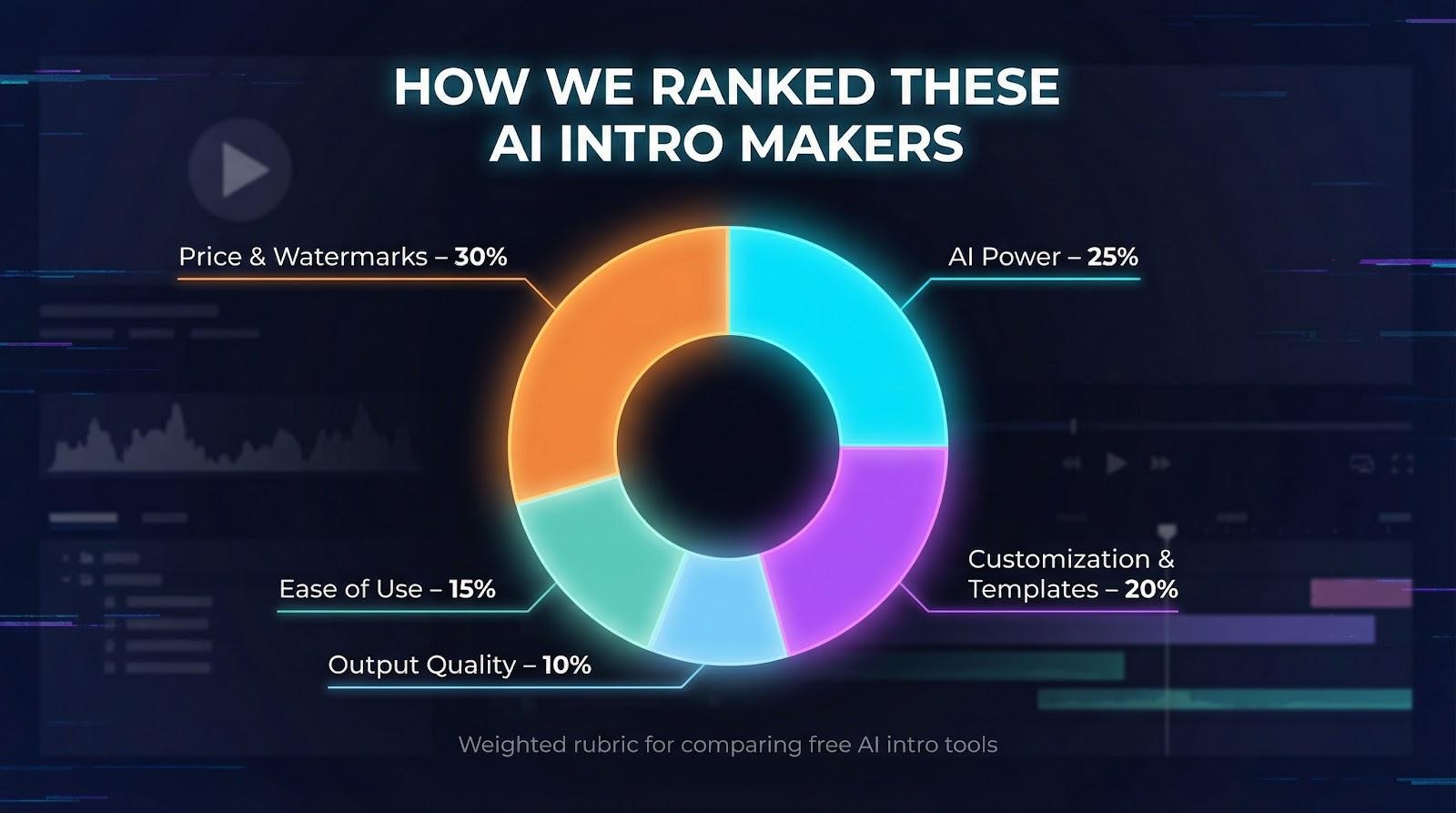
Price and watermark policies carried the most weight, 30 percent of the score, because nothing hurts credibility faster than a logo you didn’t ask for. If a free export looked clean and crisp, the tool started with an instant advantage.
Next came raw AI power at 25 percent. We looked for features that remove work instead of decorating a template: text-to-video engines, image-to-animation tricks, and voice synthesis, anything that turns a blank screen into a finished intro in minutes.
Customization and template depth sat at 20 percent. A hundred presets are useless if they all look the same, so we favored platforms that let you tweak colors, pacing, and aspect ratios without advanced motion-graphics skills.
Ease of use scored 15 percent. We timed how long it took from sign-up to the first export and noted roadblocks, such as steep learning curves and hidden paywalls.
Finally, output quality rounded out the last 10 percent. Full-HD or 4K exports mattered, but only after the intro cleared the tougher hurdles above.
This rubric gives us an evidence-driven ranking you can trust, not another top-ten list built on gut feelings.
Quick-scan comparison table
You’ve seen our rubric, but numbers alone don’t tell the whole story. Sometimes you just need a quick snapshot: one glance shows which platform delivers 4K for free and which stamps a watermark on every frame.
The table below does exactly that. It reduces each tool to the essentials so you can match your priorities: price, AI flair, and target audience.
| Tool | Free plan limits | Watermark on free? | Signature AI talent | Ideal user | Max output |
| CapCut | Unlimited exports | No | Auto-captions, voice synth | Zero-budget gamers | 4K |
| Leonardo AI | Daily credits | No | Image-to-video logo animation | Creative tech channels | HD |
| Pixelcut | Limited daily generations | No | Prompt-driven logo effects | Mobile-first creators | 1080p |
| InVideo | 720p, watermark | Yes | Script-to-video drafts | Content marketers | 1080p* |
| FlexClip | 1 min, 480p | Yes | AI script plus text-to-video | Absolute beginners | 1080p* |
| Renderforest | 360p preview | Yes | Logo reveal wizard | Brand-focused businesses | 1080p* |
*Paid tier required for full-HD export.
Keep this cheat sheet handy as we dive into each platform. You’ll see how the points above translate into real-world strengths and deal-breakers.
1 Leonardo AI: generative logo magic in a few words
More than 2.7 million clips have already been created with Leonardo’s video generator, proof that a single prompt is enough to transform static art into polished motion.
Type a prompt, upload a static logo, and watch it come alive. The engine converts your image into a smooth, looping animation such as neon lightning or pixel smoke, then outputs a clean HD file (1920×1080) with no watermark.
Leonardo AI video generator logo animation interface screenshot
There is no timeline, no keyframes, and no fiddly layers. Regenerate until the motion matches your mental picture, download the clip, and drop it into any editor for music and text. Clip length is still short, but for an eye-catching opener, the originality is hard to beat.
Best for creators who want a one-of-a-kind animated logo without pro software.
2 CapCut: pro-grade quality on a zero-dollar budget
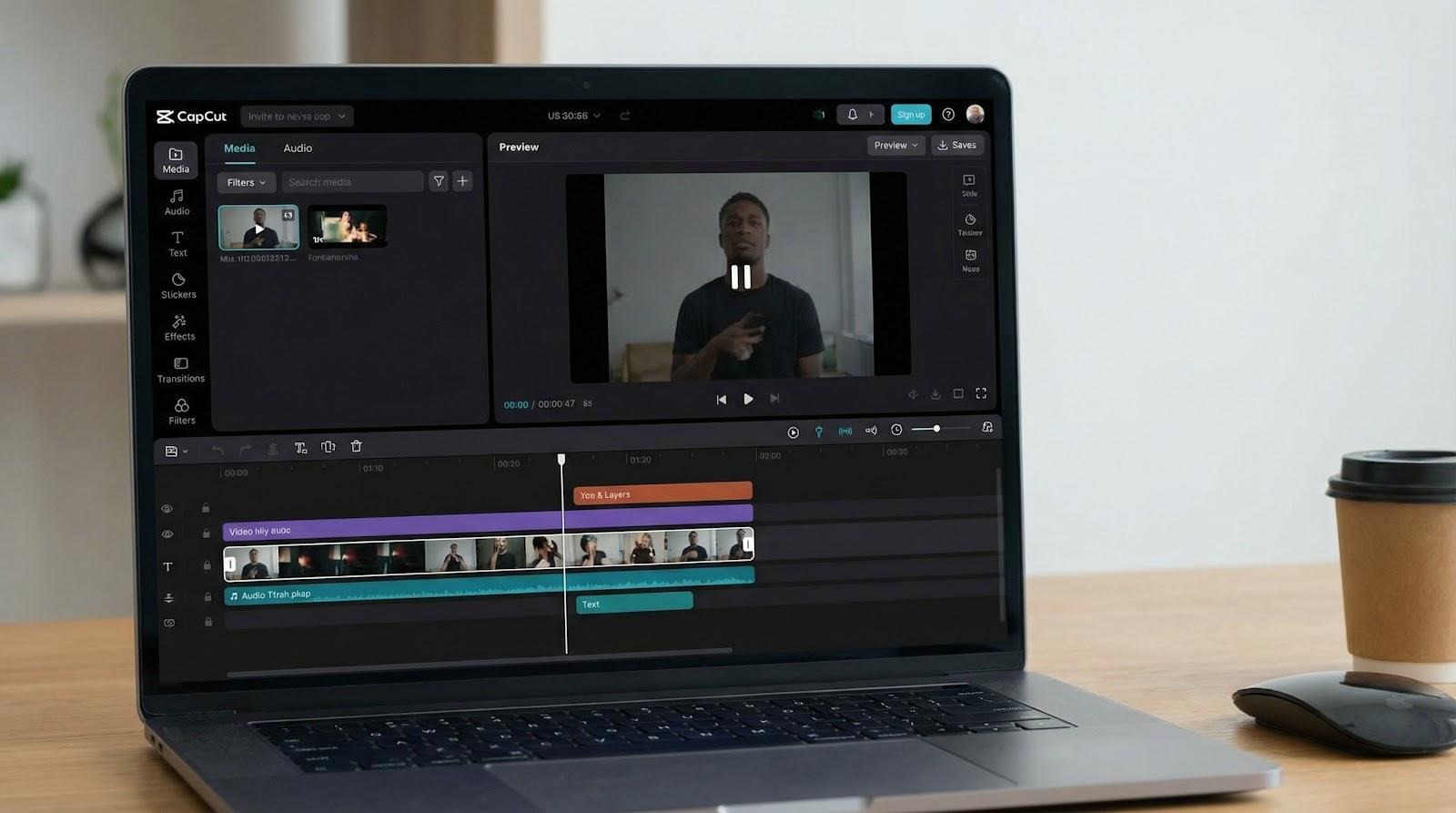
CapCut feels like a hidden shortcut. Open the web app, drag in your logo, choose a community intro template, and export at full 4K (3840×2160) with no watermark, no time limit, and no payment wall.
CapCut web intro video editor timeline screenshot with 4K export
The workflow is friendly even if you have never touched a timeline. Drop a music bed, let auto-captions generate your channel tag, then add AI motion-tracking effects for glitchy text or neon streaks. The time from blank canvas to download is often under 10 minutes.
That freedom makes CapCut a smart starting point for creators on a ramen budget who still want studio-grade polish.
3 InVideo: script-to-finished intro in a single prompt
If you dread starting from a blank canvas, InVideo feels like a creative safety net. Type a single sentence, such as “Tech channel intro with glitch text and upbeat synth,” and the AI builds a full sequence—motion graphics, stock clips, music, and voiceover—timed for impact.
Editing happens after the fact. Swap footage, drag text blocks, or resize to vertical format with one click. The learning curve is steeper than CapCut’s, yet the speed at scale appeals to marketers who crank out seasonal intros.
The catch? Free exports carry a watermark and top out at 1280×720, nudging serious users toward the $ 15-per-month plan. If idea-to-output velocity matters more than total cost, InVideo’s AI assembly line delivers.
4 FlexClip: guided creation for total beginners
FlexClip greets you with a friendly prompt: “Need help writing your intro script?” Choose Yes, and its built-in GPT tool drafts the first line, suggests pacing, then passes the text to a scene builder that pairs stock footage, animated text, and background music.
Everything happens on a visual storyboard. Reorder scenes like PowerPoint slides, adjust colors with a brand palette picker, and add voiceover from a library of 400 AI voices. There is no timeline or layer stack; only drag-and-drop blocks.
The trade-off for that simplicity is horsepower. Free videos top out at one minute, 640×480, and include a FlexClip watermark. Step up to the ten-dollar plan to unlock 1920×1080 and remove the badge, a fair deal if you want a nearly guided path to a polished intro.
5 Canva: design-first templates for instant brand consistency
If your channel art already lives in Canva, turning that artwork into a motion intro takes only a few clicks. Drop in your existing logo, apply an “Animate In” preset, then select Magic Resize to create vertical, square, and widescreen versions almost instantly.
Canva shines in design control. Every font, color, and icon can be adjusted until the intro matches your thumbnail style guide. Built-in stock music and a drag-to-beat sync keep timing tight without manual keyframing.
There is no text-to-video wizard here, and many creators prefer that level of control. You make the decisions, and Canva supplies the artistry. Free users can export at 1920×1080 with no watermark when using free assets, a valuable perk when budgets hover near zero.
6 Async: AI-powered tools for turning long videos into shareable clips
If your content strategy revolves around podcasts, interviews, webinars, or long-form videos, Async helps you turn those recordings into engaging short clips in just a few steps. Upload your content, let the platform detect key moments, and quickly create social-ready snippets for multiple platforms.
Async shines when it comes to repurposing content at scale. With its AI clip maker, creators can automatically identify highlight moments and transform them into short videos optimized for TikTok, Instagram Reels, and YouTube Shorts. Captions, layouts, and aspect ratios can be adjusted instantly, making it easier to produce consistent content without manual editing.
Beyond clip generation, Async also includes tools for recording, editing, subtitles, and voice generation. This means creators can handle the entire production workflow in one place, from capturing content to publishing polished clips. The platform is especially useful for podcasters, marketers, and content teams that need to turn long recordings into multiple social media assets quickly.
Anchor:AI clip maker
7 Renderforest: Hollywood-style logo reveals, zero 3D skills required
Renderforest swaps raw AI experimentation for reliable polish. Browse a wall of cinematic templates—fiery logo explosions, chrome spins, mist-covered reveals—drop in your emblem, choose a color theme, and let cloud rendering handle the heavy lifting.
Quality looks impressive, though freedom is limited. You cannot adjust the particle path or camera move; if timing feels off, you pick a different template. Free previews arrive at 640×360 with a watermark, so most users pay a one-off export fee or choose a monthly pass after seeing the results.
If brand gravitas matters more than fine-grain control, Renderforest’s plug-and-play 3D animations make your channel look Fortune 500 in about five clicks.
8 Animaker: cartoon characters that introduce your channel for you
Sometimes a slick logo is not enough. You want a mascot to wave hello, blink at the camera, and lip-sync your welcome line. Animaker delivers that inside your browser with no drawing tablet in sight.
Build a character in minutes by picking skin tone, hairstyle, and even a gamer hoodie, then paste your script. Auto lip-sync starts, and the avatar speaks while preset actions like jump, point, or dance add energy. Backgrounds, stickers, and sound effects complete the mini-scene.
The platform lives entirely online, so large projects can lag, and free exports include a watermark and top out at 1280×720. Still, if you need a friendly cartoon host before gameplay starts, Animaker offers the quickest path to custom character animation.
9 Pictory: auto-montage intros pulled from your long-form content
Picture this: you upload a two-hour stream, click one button, and receive a 30-second highlight reel that tees up the episode. Pictory’s algorithm scans the transcript, finds quotable moments, grabs matching visuals, and stitches them into a tight intro with captions.
You can tweak any scene, but most of the work is finished before you start editing. That makes Pictory a lifesaver for podcasters, educators, and variety streamers who produce long videos yet need snack-size openers for YouTube or TikTok.
The free trial adds no watermark, only a cap on total output minutes. After that, you move to a subscription, a fair trade considering the editing hours the tool removes. Exports reach 1920×1080 in standard MP4, ready for any timeline.
10 HeyGen: a virtual host greets viewers so you don’t have to
Camera-shy but still want a human welcome? HeyGen offers a roster of lifelike AI presenters, some casual, some wearing gamer headsets, ready to lip-sync any script you provide. Choose a background, add glitch transitions, and the avatar delivers your intro in 40 languages with convincingly natural timing.

HeyGen AI avatar virtual host example for gaming intro videos
You can even clone your own voice so the avatar sounds like you without the recording hassle. Free credits cover a few low-resolution trials, while watermark-free HD exports (1920×1080 MP4) require a 30-dollar monthly subscription. For channels that value personality yet lack studio gear, HeyGen turns text into a talking head in minutes.
11 Pixelcut: mobile-first logo animations on demand
Pixelcut brings an AI motion studio to your phone. Open the app, upload your clan emblem, type “spin through electric-blue flames,” and watch four animated options appear. Pick your favorite, download a 1920×1080 MP4, and a few taps later it opens your latest upload.
Because everything runs on cloud credits, you can iterate while waiting for coffee instead of monitoring a desktop render. Edits are minimal; prompt again if the timing feels off, but the speed and originality appeal to creators who film, edit, and post entirely on a handset.
No watermark, no paywall for HD, only a daily generation cap that resets every 24 hours. For on-the-go YouTubers and TikTokers, Pixelcut is a fast way to turn a static logo into motion.
The free-plan reality check
“Free” is one of the slipperiest words in creator marketing. Yes, every platform in this guide lets you test-drive without a credit card, yet most add a watermark or cap resolution at 1280×720 and below.
A watermark is more than a small blemish; it signals to viewers and potential sponsors that you have not invested in your own brand. FlexClip notes in its help docs that the label is permanent on the free tier, no matter how polished the edit looks.
CapCut and Pixelcut are the rare exceptions; they export full-quality, watermark-free files at zero cost, which earned them top spots in our table. For everyone else, plan to pay once you approve the preview. The upside: upgrades usually cost less than a streaming subscription and lift the limits immediately.
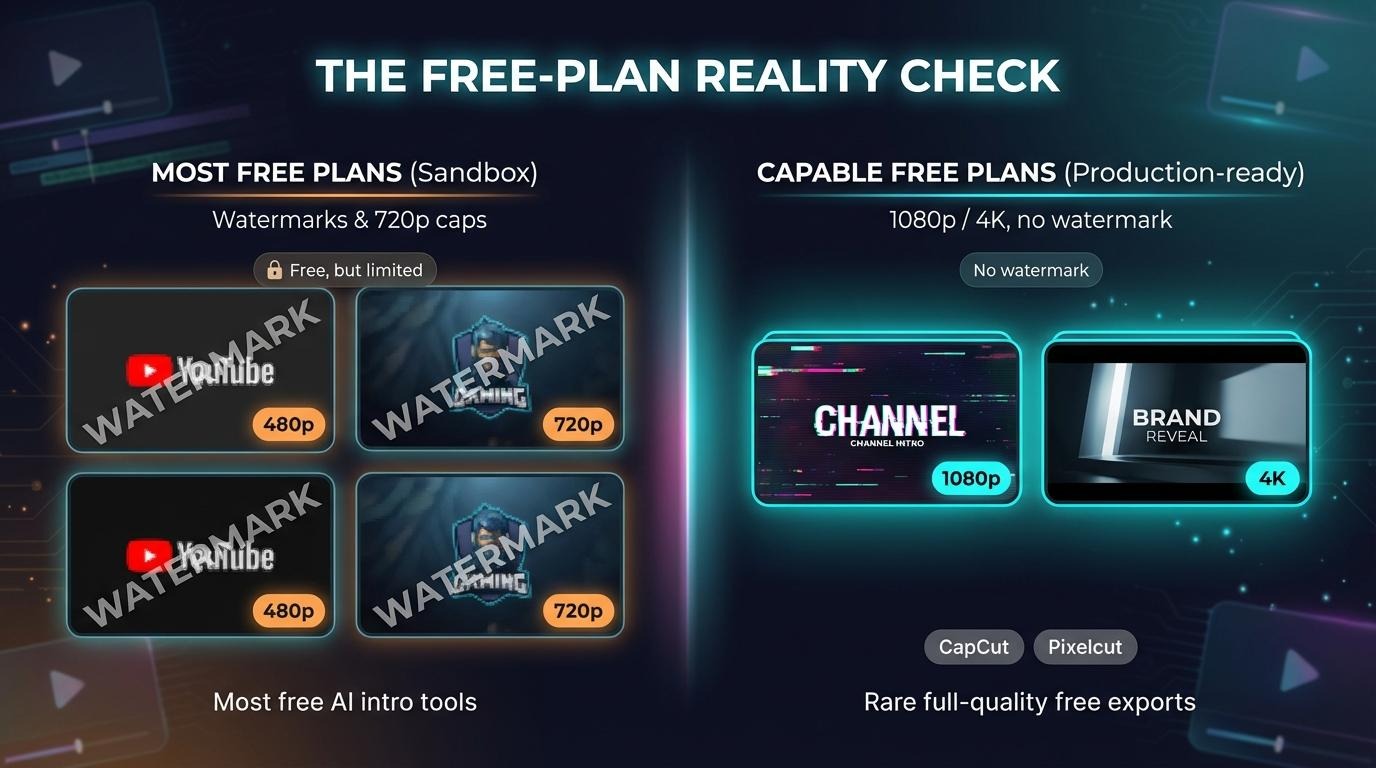
Bottom line: treat free plans as a sandbox, not a production pipeline.
Pick your weapon: a quick decision guide
Choosing the “best” intro maker means picking the constraint you can accept: budget, time, or creative control.
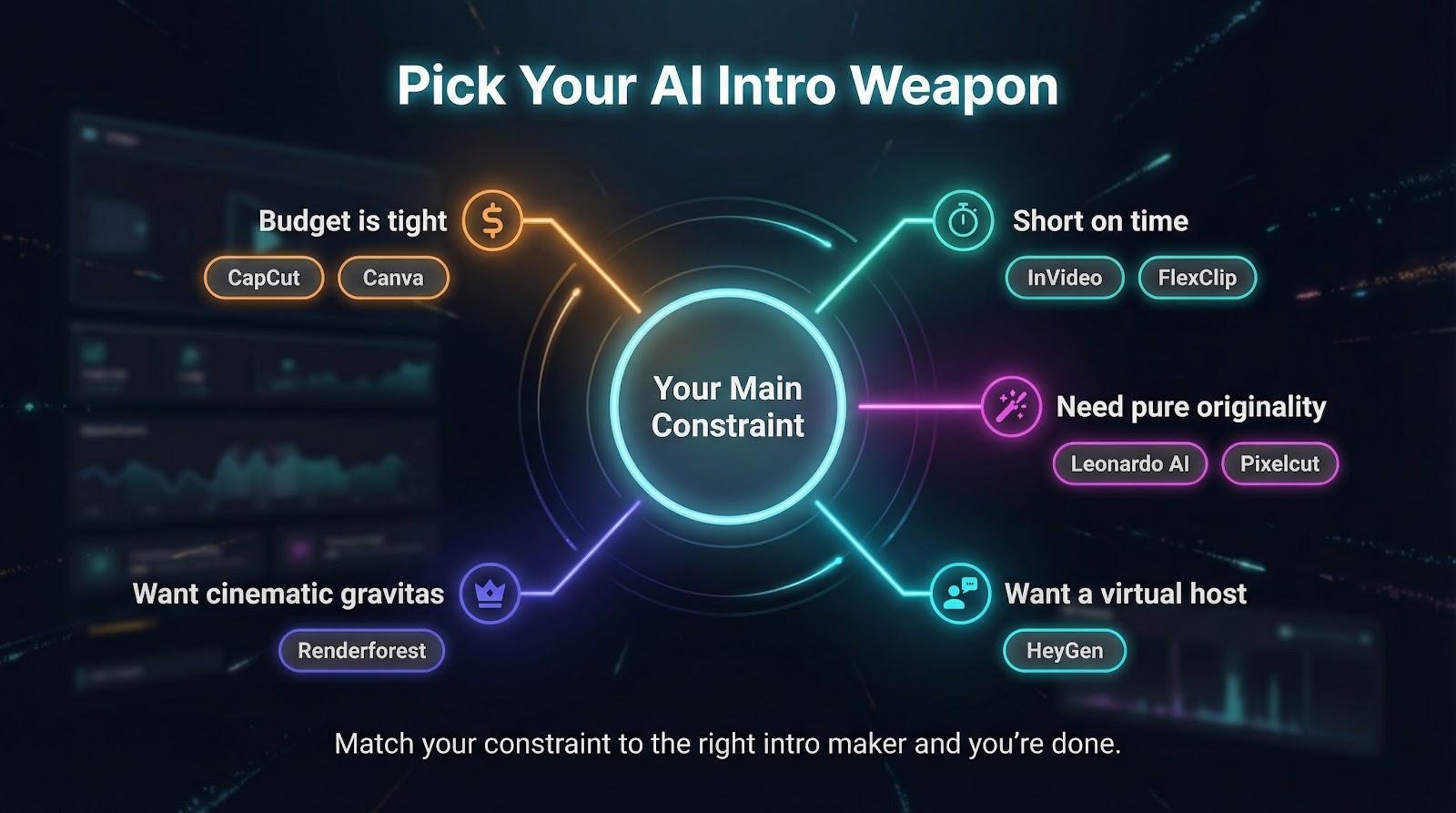
If money is tight, start with CapCut or Canva. Both export watermark-free at full quality and cost nothing.
If time is scarce, reach for InVideo or FlexClip. Type a sentence, tweak a few colors, and finish before the upload bar hits 50 percent.
Need pure originality? Leonardo AI and Pixelcut turn a prompt into animations that no template library can match.
Want a talking head without a camera? Let HeyGen handle the FaceTime.
When brand gravitas matters more than flexibility, Renderforest offers a cinematic logo reveal in just 5 clicks.
Match your top priority to the line above, and the decision is done.
Pro tips and mini-workflows
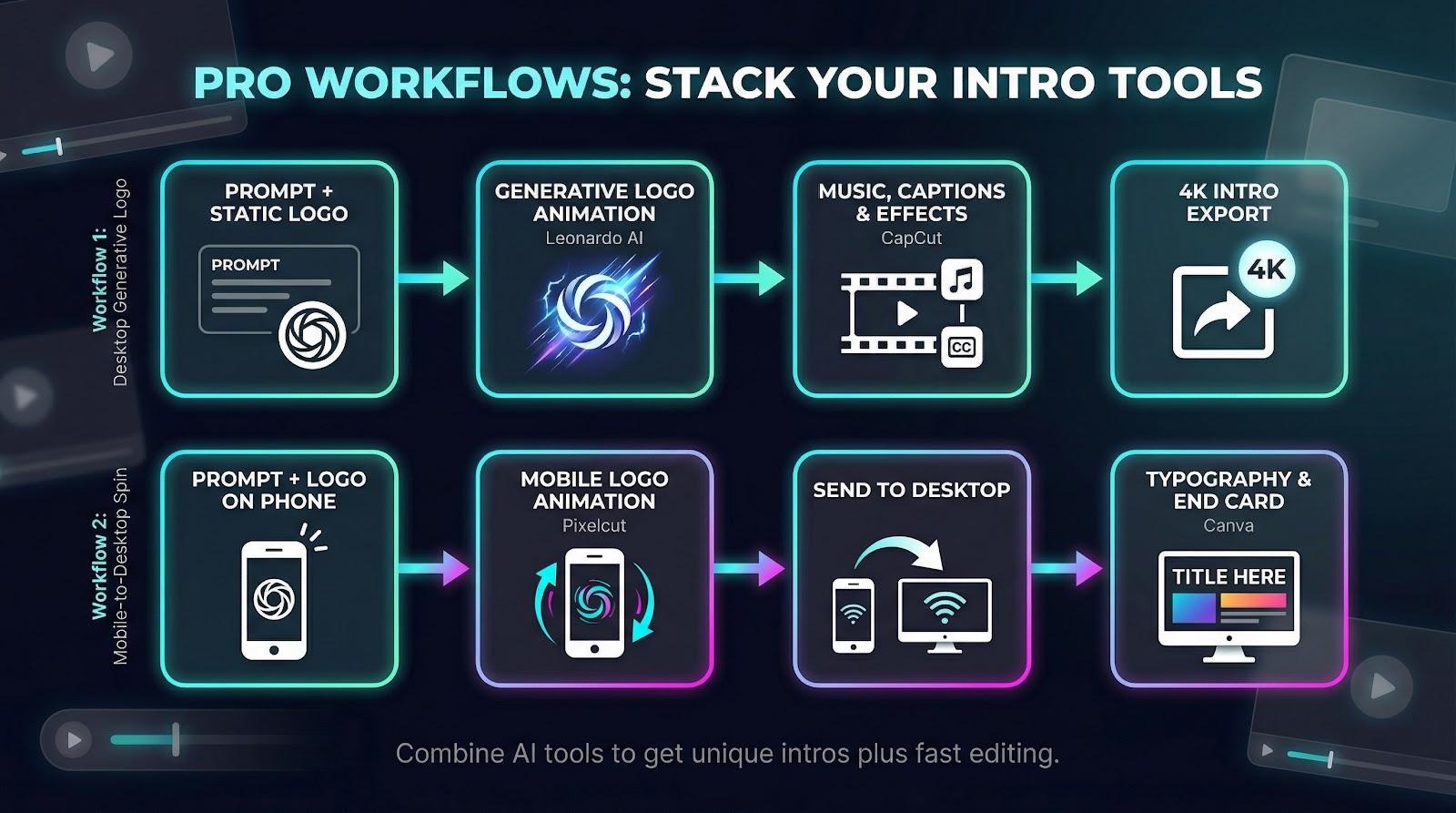
Tools rarely work alone. Pairing two together often delivers studio gloss with almost no extra effort.
Example one: create a unique logo animation in Leonardo AI, then import that clip into CapCut for music, captions, and a quick 4K export. You gain generative flair plus timeline control without spending a cent.
Example two: build a mobile logo spin in Pixelcut while waiting for coffee, airdrop it to your desktop, and use Canva to add branded typography and an end card in the exact font you use on thumbnails.
Conclusion
View each platform as a building block. Combine their strengths and watch production value rise.