

Introduction
Business document workflows have changed dramatically over the last few years. Teams no longer create files in isolation, email dozens of versions back and forth, and hope everyone is working from the latest draft. Today, organizations expect documents to move through a connected system that supports writing, review, approval, analytics, and collaboration across devices.
This shift is being driven by two major forces: AI and SaaS. Artificial intelligence is helping teams write faster, summarize complex information, improve clarity, and automate repetitive editing tasks. Software-as-a-Service platforms are making it easier to store files in the cloud, collaborate in real time, manage permissions, and keep work synchronized between desktop and mobile devices.
For companies that want to improve efficiency without making workflows more complicated, the real opportunity is not just adopting more tools, but choosing tools that fit naturally into how teams already work. The most effective document stack is the one that reduces friction, shortens turnaround time, and keeps communication clear from the first draft to final approval.
Why traditional document workflows slow teams down
Many organizations still struggle with common document bottlenecks. Content is often created in one tool, reviewed through email, revised in another file, and finally approved through chat messages or ad hoc calls. This creates version confusion, delays decision-making, and increases the risk of errors. Even small teams can lose hours every week trying to track down the latest file, clarify feedback, or manually merge edits from multiple contributors.
The problem is not just operational inefficiency. Broken workflows also affect quality. When writers, reviewers, managers, and stakeholders are disconnected from the same working environment, feedback becomes fragmented. Important comments get lost. Formatting becomes inconsistent. Approval cycles become slower than they need to be. In a fast-moving business environment, that lack of structure can directly affect productivity and execution.
How AI improves writing and review
AI is reshaping document work by handling time-consuming yet necessary tasks. Writers can use AI assistance to refine sentence structure, improve tone, shorten repetitive phrasing, or generate a first draft from a rough outline. Reviewers can summarize long reports in seconds, identify missing sections, and highlight unclear wording before the document moves to the next stage.
This matters because better drafting speed is only one part of the value. AI also reduces the cognitive load on teams. Instead of spending energy on repetitive editing, people can focus on message quality, business context, and decision-making. A marketing team can use AI to sharpen campaign briefs. A sales team can use it to polish proposals. Operations teams can use it to standardize internal documentation. The result is a workflow that is not only faster but also more consistent.
The role of SaaS in real-time collaboration
SaaS platforms solve another major challenge: coordination. Cloud-based document systems allow multiple stakeholders to work on the same file, leave in-context comments, track revisions, and restore previous versions if necessary. That kind of real-time collaboration eliminates scattered review cycles and helps teams stay aligned.
For distributed or hybrid teams, the value is even greater. A colleague can start editing a proposal on a desktop in the office, another reviewer can comment from a laptop at home, and a manager can approve the final changes from a mobile device while traveling. Because the workflow is centralized, visibility improves and turnaround time drops. Teams no longer need to ask, Which file is the latest one? The system already answers that question.
Cross-device access and workflow continuity
Modern document work does not happen on one device. People move between office desktops, personal laptops, tablets, and phones throughout the day. That is why cross-device access has become a basic requirement rather than an optional feature. When tools support seamless synchronization, teams can keep momentum even when context changes.
This is one reason many businesses evaluate practical office productivity solutions that balance usability with collaboration features. For teams comparing lightweight document tools, cloud-based editing, and flexible workflow support, wps can be considered as part of a broader productivity stack when document compatibility, ease of use, and cross-device collaboration matter. The key is not the label of the tool, but whether it fits smoothly into the team’s daily process and reduces unnecessary friction.
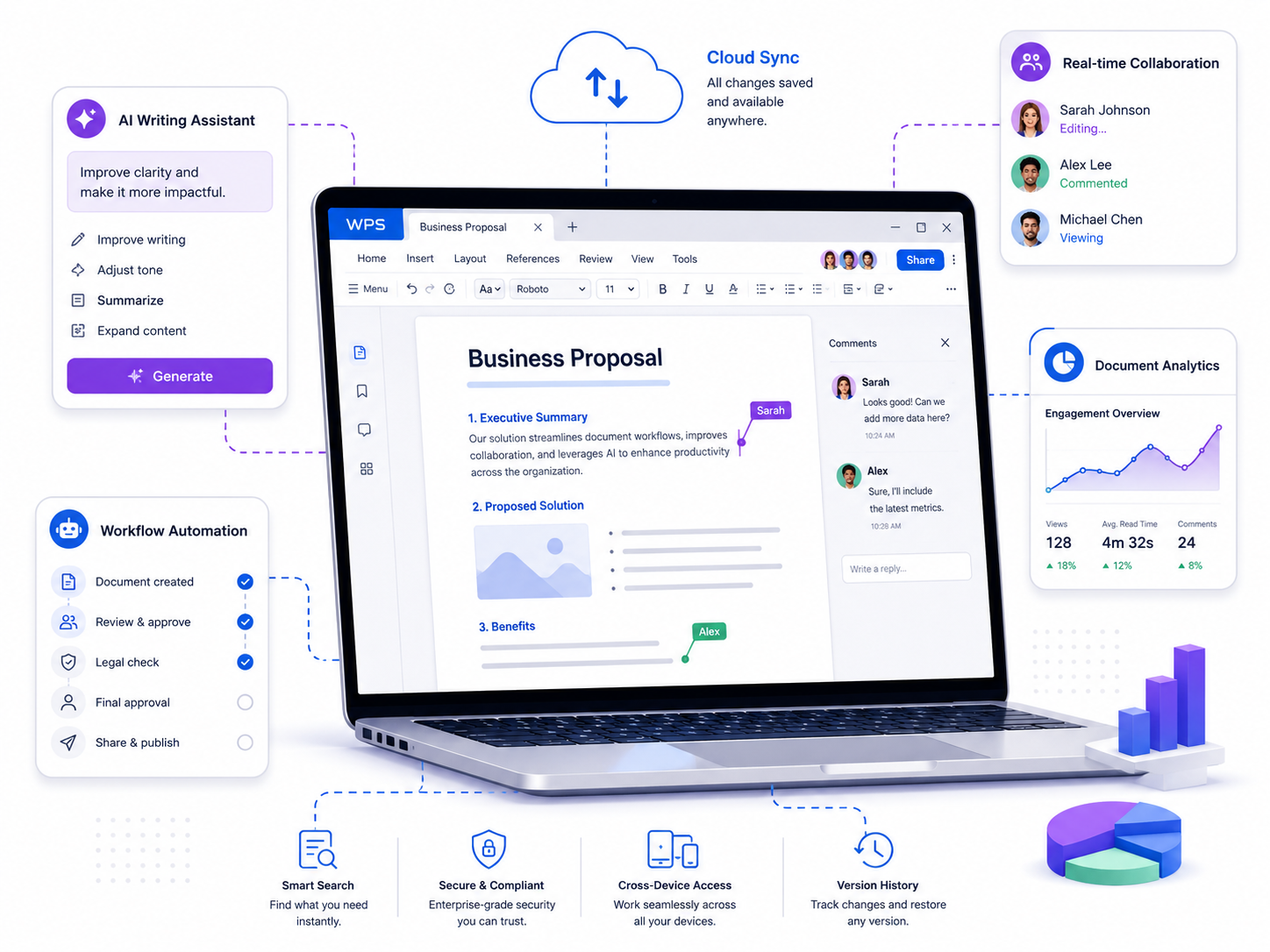
Figure 2. Cloud sync, AI assistance, workflow automation, and real-time collaboration in one document environment.
Security, compliance, and document control
As document workflows become more connected, security becomes more important. Businesses need tools that support permission controls, version history, access visibility, and secure sharing. AI may help speed up drafting, and collaboration may help content move faster, but neither matters if sensitive information is exposed or governance breaks down.
The best document workflows combine convenience with control. Teams should be able to assign access levels, monitor changes, review comments, and maintain a clear approval trail. For organizations in regulated or client-facing industries, that level of control is essential. A good workflow should make productivity easier without introducing unnecessary security risk.
How to choose the right document workflow stack
When evaluating document tools, companies should look beyond feature checklists and focus on workflow fit. A useful question is: Can multiple people collaborate in real time? Are comments and approvals easy to manage? Does the platform support cloud sync and cross-device access? Are AI features actually practical, or are they just marketing extras? How well does the tool integrate into the existing communication and productivity environment?
The most effective stack usually combines a document editor, collaboration tools, cloud storage, and lightweight automation. Teams should also consider user adoption. A tool that looks powerful but is difficult to learn may slow work down rather than speed it up. On the other hand, an intuitive, reliable, and flexible tool can generate long-term gains in both efficiency and consistency.
Conclusion
AI and SaaS are not replacing business writing. They are improving the systems around it. By helping teams draft faster, collaborate more clearly, automate routine steps, and keep documents accessible across devices, these tools are turning document workflows into a more connected and productive process.
For modern businesses, the goal should be simple: build a document environment that makes it easier to create, review, approve, and share high-quality work. Organizations that get this right will spend less time managing friction and more time advancing ideas.




