
Growing a startup is enough work already. Now you want to get into video marketing! You want product demos, social media videos, commercials, and a new video for each campaign. Think that’s easy? Not when your tiny team is also growing sales, supporting customers, and building your product – and then filming and editing a new video for each campaign.
Here’s what AI video tools can do for you. Enhance existing content, generate new content, edit faster, and prepare content for multiple platforms. Less time working on repetitive tasks, more time to focus on marketing. Now, AI isn’t going to save a bad strategy, but it can certainly make your content creation much easier!
More Platforms, More Videos, More Headaches
One product launch. Five distinct videos. Sound right? Maybe you need a short Instagram Reel, a longer YouTube demonstration, a video for your website and a handful of ads. And no, you can’t simply share the same video everywhere. Every platform requires a different length, format, and style. From one campaign, you can now have five or six different videos to create.
And that’s if your footage is even good to go! Perhaps your product demo is slightly blurry. Or your founders video was filmed in a poorly lit room. Even footage from your suppliers may need a few tweaks before it matches your company’s brand.
Here’s the hard part: Who’s going to do it? Your small team is already engaged in sales, clients, and day-to-day work. Training in the editors for every small change is not an inexpensive task. Before you know it, you’re becoming a video editor rather than a marketer.
Stop Making Every Video from Scratch
Here’s a smarter way to do video marketing. Let’s see if this isn’t a better way to use up that old stuff.
For example, you might create a five-minute demo of your product. That one recording could become an Instagram Reel, a YouTube tutorial, a short ad or a segment on your website. You’ve got one recording to make lots of different content pieces. Editing, quality adjustments and resize work can be taken care of by AI tools.
Here’s how the approach changes:
| Traditional approach | AI-assisted approach |
| Make every video separately | Reuse existing footage |
| Fix quality issues manually | Automate suitable fixes |
| Edit from scratch for each platform | Create multiple versions from one video |
| Repeat the same editing tasks | Use a standard workflow |
| Rely heavily on editing staff | Get more done with a small team |
A Simple Four-Step Video Workflow
You don’t need to get too complex. This is just a process your team can do for each campaign.
- Develop: Begin with a script, photos of the product, or test footage. You can also use AI to generate pictures or create ideas.
- Enhance: Did you have blurry, grainy footage? Use tools that improve clarity, lighting, and quality of footage where possible.
- Adjust: Use a full-length video for an Instagram video, for example. Resize, reword, and add captions to make it suitable for Instagram, YouTube, TikTok, or your website.
- Post: Maintain the videos you want to publish and plan them as per your marketing activities.
And that’s about it! The point isn’t to have AI do all the work in your marketing department. It is to get rid of the dull, repetitive stuff so your marketing staff can spend more time doing the stuff that gets attention-storytelling and talking to your customers.
Where AI Can Save Your Marketing Team Time
You don’t need to shoot every video. And you don’t need to spend hours editing every clip. Sometimes just a few quick edits will do the trick. These are the moments when you need AI video tools to lend a hand.
1. If You Do Not Have Enough Footage
Have an amazing product but not a lot of videos? No big deal. Use an AI service to turn your product images, scripts, and campaign ideas into a rough video. Experiment with different styles and concepts and avoid having to do a new shoot all the time.
Certainly, you will still want to ensure the results show your product correctly. However, this is a simple tool to use for testing out new ideas.
2. When Your Videos Don’t Appear to Be ‘Good Enough’
You even have a product demo recording and it’s blurry, or your founder has submitted a quick video message in no light. Do you have to get a re-shoot? Not a kind of!
They can make soft footage sharper, smooth out the grain, enhance colors, or upscale low-res footage. They can also help with dealing with compression artifacts, but they won’t be able to fix everything.
3. When You Need Videos for Multiple Platforms
One video doesn’t always work for all the platforms. A demo on YouTube? Looks awesome in widescreen. The same demo on Instagram? Usually, you want a vertical (tall & skinny) view.
AI can resize videos, crop out parts of the video, and create shorter clips from the longer ones. Try a different opening or hook for different audiences. Same footage, more ways to use it!
4. If Editing is Beginning to Drag Out Too Long
It’s easy to edit one video. But editing 20 similar videos? Now that can be a different story.
Rather than repeating the same correction over and over, use AI services to edit a batch of videos, determine the best quality enhancements, and automate the repetitive work. Have a video editor and team go through the results to identify the edits that require a human touch.
You don’t have to use AI for everything. Take something that’s already halting your production. If you’re only a few steps away from great footage, like it’s low-res or pixelated, you’ll get more bang for your buck by fixing it than filming it again.
Give Your Old Videos Another Shot with DesignKit
Not all videos can be perfect. After Effects or Photoshop skills can take too long to learn or simply not the right tools for your job. Your product demo has poor focus. Perhaps a customer video review was sent to you at the wrong exposure. You’ve captured a great video, but the quality is off.
This is where Designkit comes in. It’s a web-based toolkit to create and enhance marketing content. Its video enhancer clears up fuzzy videos, removes noise, corrects some compression artifacts, and enhances darker videos. Upscale videos from 1K, 2K, or 4K.
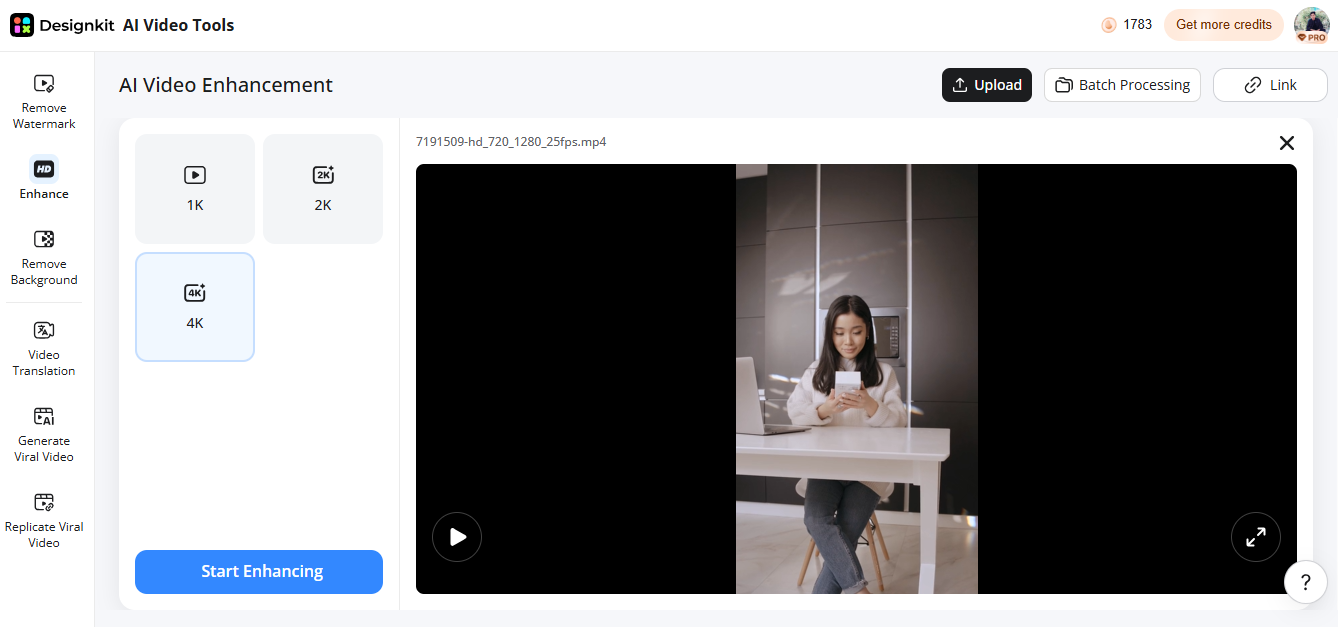
It is really easy to use: just upload your video or paste a link from a supported social media, set a resolution and the tool will do the rest. Have multiple videos? They can all be uploaded at the same time rather than individually. When finished, compare all the original videos with the resolutions you set and download what you want.
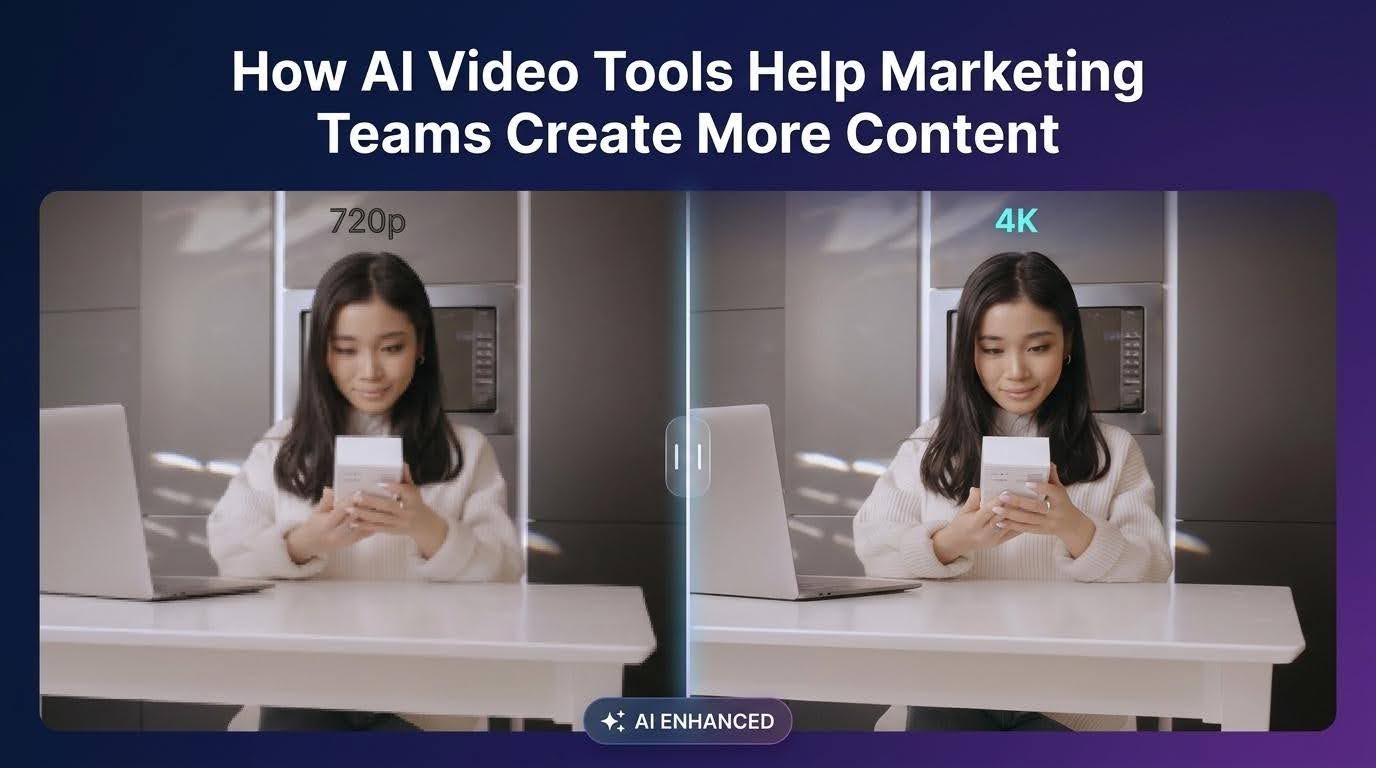
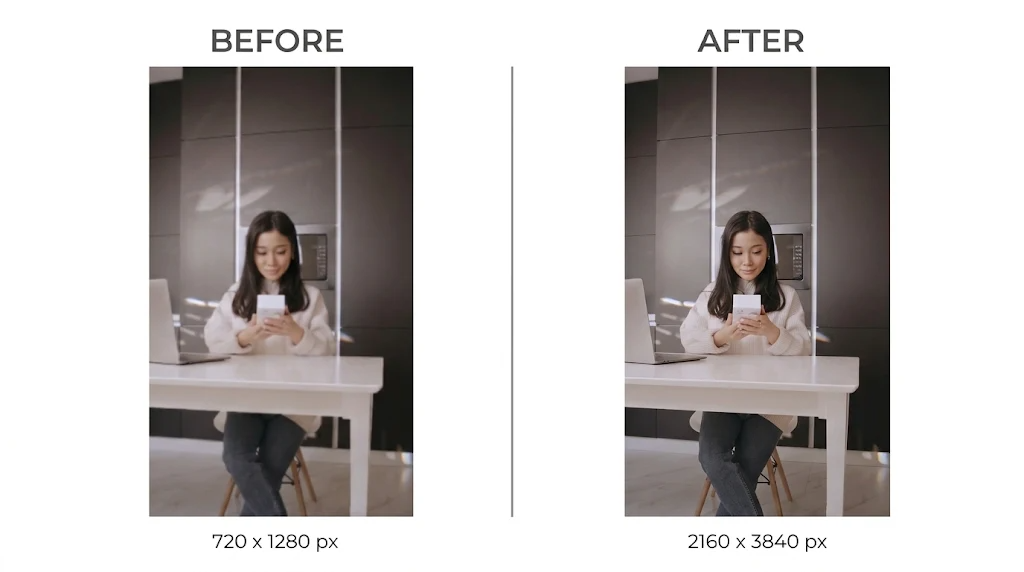
Before vs. after comparison
Wink HD Video Converter transformed the old blurry 720p video to 4K resolution by reconstructing all the details.
Is AI Really Saving Your Team Time?
So, you’ve started using AI video tools. Great! But how do you know they’re actually helping? Just making more videos isn’t enough. You also need to check how much time and money you’re saving.
Here are a few things worth tracking:
| What to Track | Why It Matters |
| Production time | Are videos getting ready faster? |
| Cost per video | Are you spending less on each usable clip? |
| Videos per shoot | Are you getting more content from the same footage? |
| Revisions | Does your team spend less time fixing mistakes? |
| Posting schedule | Can you publish content more regularly? |
| Engagement and conversions | Are people watching, clicking, or buying? |
Leave No Marketing Video Behind
Already have some footage to reuse, so why start from scratch? AI video tools not only can speed things up but also enhance the quality and boost productivity when producing content. AI-based editing tools such as Designkit are excellent for repurposing your old video assets. As always, just produce marketing-oriented videos, not just more videos.