

Presentations are crucial in today’s workplace, whether it’s for a quarterly report or a product launch. A well-designed and clear PowerPoint can make or break a project. However, the traditional process of creating presentations is time-consuming and tedious, and each step can slow your workflow.
This article explains how to use the latest AI-powered presentation tools to streamline your presentation process so that you can spend more time on content development and strategy, and less on tedious formatting.
AI Presentation Maker: The Key to Boost Office Efficiency
The real benefit of an AI presentation maker is its ability to handle repetitive tasks like design and formatting, which are low on creativity but high on time consumption. This lets you go straight from idea to execution, especially in situations that demand speed, professionalism, and teamwork:
- Routine Office Tasks and Quick Reporting
In weekly meetings or monthly reports, we often need to turn work results into presentations quickly. A powerful AI can generate a well-structured template from your main points or raw documents in no time, reducing hours of work to just minutes, ensuring your message is delivered clearly and quickly.
2. Cross-Platform Collaboration and Compatibility
In complex team collaborations, sharing presentations with colleagues using different software or devices can be a headache. An AI-powered presentation maker often includes features such as file conversion and compression, allowing you to convert a PowerPoint to a PDF while preserving formatting, without needing multiple tools.
3. Deep Content Summarization
When working with lengthy reports or meeting notes, it can be difficult to identify key points quickly. An AI presentation maker can analyze long texts, extract key insights, and turn them into concise, organized slides, making it easier to turn existing content into a structured presentation.
WorkPPT: Choosing the Right AI Presentation Platform
Not all AI presentation makers are created equal. A professional tool should address all user needs throughout the workflow, not just content creation.
WorkPPT AI presentation maker stands out as a user-friendly AI platform that requires no learning curve. It offers an easy, professional online environment where you can complete the whole process without downloading complex software. Here’s why WorkPPT is ideal:
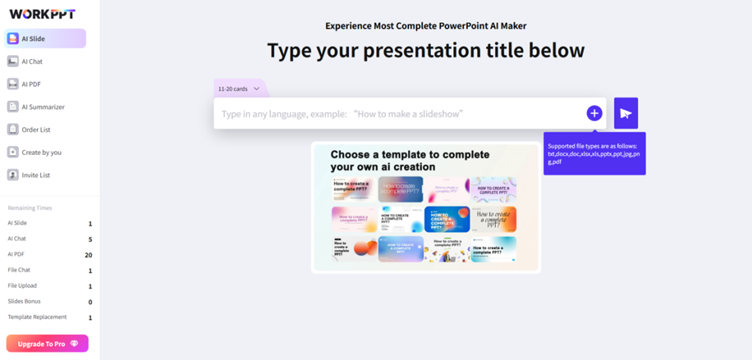
Content Creation Efficiency: Use the core AI-powered PPT maker and AI Summarizer to quickly transform large amounts of text into clear, organized presentations.
No Format Worries: Built-in tools for file handling, such as converting PPT to PDF and vice versa.
Collaboration & Sharing: Includes PPT compression to solve issues with large file sizes when uploading or sharing via email.
With WorkPPT’s all-in-one solution, professionals can focus entirely on content optimization and presentations, without the hassle of switching between tools to deal with file formats or sizes, streamlining workflows and boosting efficiency.
Step-by-Step Guide: Creating Efficient Presentations with WorkPPT
WorkPPT is an AI-powered presentation tool that focuses on simplicity and quality. The process typically involves just three key steps, emphasizing input quality over complexity.
Step 1: Enter a Clear Topic
Open your browser and go to ppt.softtooler to access the WorkPPT platform. Click to start creating with the AI PPT feature.
In the input box, enter a clear topic (e.g., “Create a report on Q3 sales data analysis for the marketing department”) or upload a Word/PDF file.
The AI will analyze the input and automatically generate an outline for your presentation.
Step 2: Customize and Refine Content
Once the AI generates a draft, you’ll receive a slide deck with a cover, table of contents, and full content. Review the titles and text to ensure they convey your message. Use the editing tools to adjust the content and order of the slides until it’s just right.
Step 3: One-Click Formatting and Export
Once you’re satisfied with the layout and readability, use WorkPPT’s features to export or finalize your presentation. For example, you can lock the format as a PDF if you need to send it to a client for review.
Tips and Considerations: Going Beyond Just WorkPPT
To truly unlock the potential of AI tools like WorkPPT, it’s important to go beyond the tool itself and focus on blending content with professionalism.
Tip 1: Be Clear with Text Input
When providing a topic and instructions, make sure to state clearly what you want the AI to create. This helps the AI produce content and tone that better align with your presentation needs.
Tip 2: Add a Personal Touch
AI can provide the framework, but you bring the soul. Don’t simply use the AI-generated wording as-is. Enhance key phrases with your expertise and personal style, and replace generic descriptions with real-world examples to give your presentation your unique brand and depth of thought.
Tip 3: Verify Your Data and Facts
While AI is powerful, it sometimes generates information that sounds plausible but is actually incorrect. Always manually check key data, charts, and references for accuracy. Never leave fact-checking to the AI.
Conclusion
An AI presentation maker is more than just a productivity tool, it’s a game-changer for knowledge workers, helping them focus on high-value tasks. It frees you from repetitive design, formatting, and conversion work, giving you more time to dive into data, refine your logic, and perfect your speech. If you’re looking for an all-in-one online tool that combines an AI PPT Maker with features like file conversion and compression, try WorkPPT. With its powerful suite of office tools, you can quickly create professional presentations, freeing up your focus for content and strategy.





