
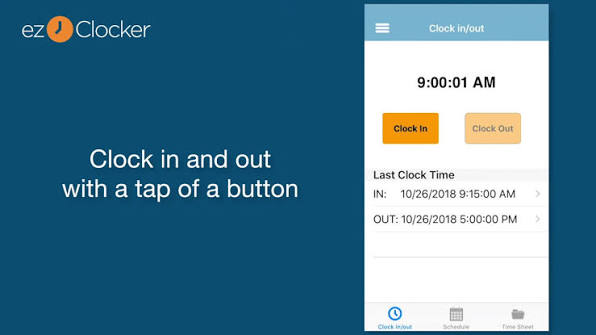
ezClocker is a mobile time clock built for small businesses with hourly workers, and its pitch to contractors is simplicity: one tap to clock in, a GPS stamp on every punch, and a flat monthly price for the whole crew. The question is whether a deliberately basic app covers enough of what a contracting business needs.
This review covers what ezClocker costs in 2026, what it does well on job sites, where it falls short, how it compares with Clockify for field crews, and how to test it with your own workers during the free trial.
ezClocker at a glance
| Question | Answer |
| Best for | Small contracting crews that want a simple clock-in app with location stamps |
| Starting price | Free for 1 employee; paid plans from $15 per month for up to 15 employees |
| Billing model | Flat company price by employee band, not per seat; 20% off yearly plans |
| Free trial | 30 days, no credit card required when you sign up on the website |
| GPS | Location captured at clock-in and clock-out only, not during the shift |
| Platforms | iPhone, Android, web, and a tablet kiosk mode |
| Ratings (per ezClocker) | 4.8 on Capterra, 4.6 on Google Play, 4.8 on the Apple App Store |
What is ezClocker?
ezClocker is a time tracking and scheduling app from ezNova Technologies LLC. Workers clock in and out on their own iPhone or Android phone, or on a shared tablet, and owners review timesheets, schedules, and clock-in locations from the web or the app.
It’s cloud-based, so there’s nothing to install beyond the mobile app. The company positions it for owners whose crews aren’t tech-savvy and who don’t want to pay for features they’ll never use. Contractors are a core audience, along with field service, property management, and other small businesses with workers spread across locations.
ezClocker pricing breakdown
ezClocker charges one flat monthly price for the company, based on how many employees you have, rather than a fee for every user. Yearly plans save 20%.
| Plan | Price (monthly billing) | Employees | What it includes |
| Basic | $15 per month | Up to 15 | Mobile and web time clock, GPS verification, employee scheduling, pay-period export to CSV |
| Standard | $30 per month | Up to 30 | Everything in Basic, plus job tracking, overtime calculations, geofencing, time off, and payroll integrations |
| Premium | $60 per month | Up to 60 | Everything in Standard, for larger crews |
A free plan covers a single employee, which suits owner-operators. Every paid plan starts with a 30-day free trial. Signing up through the website needs no credit card, you can add as many employees as you like during the trial, and support is included while you test.
The practical takeaway for contractors: if you want hours tied to specific jobs, budget for Standard at $30 a month rather than Basic.
What ezClocker does well

Simple enough for any crew. Workers clock in with one tap on Apple or Android phones, and the app is designed for employees who aren’t comfortable with new software or don’t have time for training.
Location stamps without all-day tracking. A GPS location is saved when a worker clocks in and again at clock-out, and owners see both on a map. The app doesn’t follow workers during the shift, which makes the switch an easier conversation with a crew wary of being watched.
Scheduling built for multiple sites. Owners can schedule shifts with the job location and instructions attached, and workers see their schedule on their phones. That cuts down on the texts and calls that usually come with last-minute changes.
A kiosk on any tablet. Instead of buying a hardware time clock, you can turn a tablet into a shared clock-in station where workers punch in with a four-digit PIN.
Flat, predictable pricing. One price covers up to 15 employees on Basic, so adding a worker doesn’t raise your bill until you outgrow the band. The ezClocker time clock for contractors also groups exported timesheets by project, so owners can see total labor hours per job on the Standard plan.
Real payroll time savings. One customer, an electrical contractor in Rhode Island, says processing payroll went from taking his whole Saturday to about 10 minutes.
Where ezClocker falls short
Basic by design. ezClocker focuses on clocking in, scheduling, and exporting hours. Reviewers describe its reporting and scheduling as straightforward rather than advanced, so it won’t replace project management or full job costing software.
Job tracking needs Standard. Job tracking, overtime calculations, geofencing, time off, and payroll integrations all start on the $30 Standard plan. Crews that want hours tied to jobs should plan for that tier from day one.
No in-shift location data. Because GPS is captured only at clock-in and clock-out, you can’t see where a worker went during the day. That protects worker privacy, but owners who need route or site-visit tracking will want a different tool.
Overtime rules are standard. From the Standard plan, the app calculates overtime automatically based on the thresholds you set. If your state has more complex overtime or break rules, confirm the settings match them before you rely on its reports.
A ceiling on crew size. Premium covers up to 60 employees, so larger contractors will outgrow it.
Who should use ezClocker?
ezClocker is a good fit for:
- Contractors with up to 30 workers who want a simple clock-in app their whole crew will actually use
- Owners who need to confirm where crews start and finish without tracking them all day
- Businesses that want one flat monthly price instead of paying for every user
- Crews that share a tablet at the yard or shop and clock in with a PIN
ezClocker may not be enough for:
- Contractors who need live location or route tracking during the shift
- Firms that want detailed job costing, budgets, and forecasting inside the time clock
- Businesses with more than 60 employees
When to consider an alternative
ezClocker works best as a simple, affordable time clock. If you need route optimization or automated crew dispatch, field service platforms are built for that job instead. Look elsewhere too if any of these apply:
- You need to see where workers go during the day, not just where they punch in.
- You want labor costs, project budgets, and profit tracked inside the same app.
- Your crew is larger than 60 people, or growing quickly toward that size.
- You need complex overtime or break rules handled automatically for your state.
ezClocker vs Clockify for contractors
Clockify is one of the best-known low-cost time trackers, and Capterra lists it among ezClocker’s top alternatives. They price very differently, which matters more as the crew grows.
| Feature | ezClocker | Clockify |
| Billing model | Flat company price by employee band | Per seat; owner and admins each take a seat |
| Cost for 15 workers with GPS and scheduling | $15 per month (Basic) | $149.85 per month (Pro, 15 seats, monthly billing) |
| GPS | Location at clock-in and clock-out; geofencing on Standard | Optional location tracking while on the clock (Pro) |
| Scheduling | Basic and above | Pro and above |
| Hours by job or project | Standard ($30 per month) | Every plan, including free |
| Overtime report | Standard and above | Standard and above |
| Kiosk clock-in | Tablet kiosk with PIN on every plan | Basic and above, with PIN |
| Free option | Free for 1 employee; 30-day trial on paid plans | Free plan for up to 5 users; 7-day Pro trial |
For a crew that mainly needs to clock in, see where people punched in, and follow a schedule, ezClocker’s flat price is far cheaper. Clockify makes more sense for very small crews that fit its free plan, or for firms that want labor cost and budget tracking in the same tool and can justify Pro pricing.
How to test ezClocker during the free trial
Thirty days is enough to run a full pay period, so use the trial to test the app the way your crew will use it.
- Have two field workers install the app on their own phones and clock in without help.
- Check the GPS stamps on the map to confirm each punch shows the right job site.
- Build a week of shifts with locations and instructions, and ask workers to confirm they can see them.
- Set up a tablet as a kiosk at the yard or shop and try a PIN clock-in.
- Export a pay period and confirm it imports cleanly into your payroll process.
- If you want hours by job, turn on job tracking and check the totals per project against what you expected.
Check travel time as you test. The U.S. Department of Labor treats time workers spend traveling between job sites during the workday as hours worked, so make sure those hours land in the timesheet rather than disappearing between punches.
Final verdict
ezClocker does a small number of things well: one-tap clock-in, a location stamp on every punch, simple multi-site scheduling, and a flat price that doesn’t climb with every new hire. For contracting crews of up to 30 people, it’s an affordable, low-effort way to replace paper timesheets.
It isn’t a full job costing or project management tool, and job tracking needs the $30 Standard plan. Use the 30-day trial to run one full pay period with your crew, and you’ll know whether its simplicity is a strength or a limit for your business.
Frequently asked questions
How much does ezClocker cost?
A free plan covers one employee. Basic costs $15 per month for up to 15 employees, Standard costs $30 for up to 30, and Premium costs $60 for up to 60. Prices are flat for the company, not per user, and yearly plans save 20%.
Is there a free trial?
Yes. Every paid plan starts with a 30-day free trial, with no credit card required when you sign up on the website. You can add as many employees as you like during the trial.
Does ezClocker track employees’ location all day?
No. It captures a GPS location only when a worker presses clock in or clock out. Owners can view those locations on a map, but the app doesn’t track movement during the shift.
Can ezClocker track labor hours by job?
Yes, on the Standard plan. Owners can export timesheets and group them by project to see total hours spent on each job.
Does ezClocker work as a shared kiosk?
Yes. Any tablet can become a clock-in station, and workers punch in with a four-digit PIN.
Can ezClocker send hours to payroll?
Every plan exports pay periods to a CSV file you can send to your accountant or payroll provider. Payroll integrations are included from the Standard plan.




