

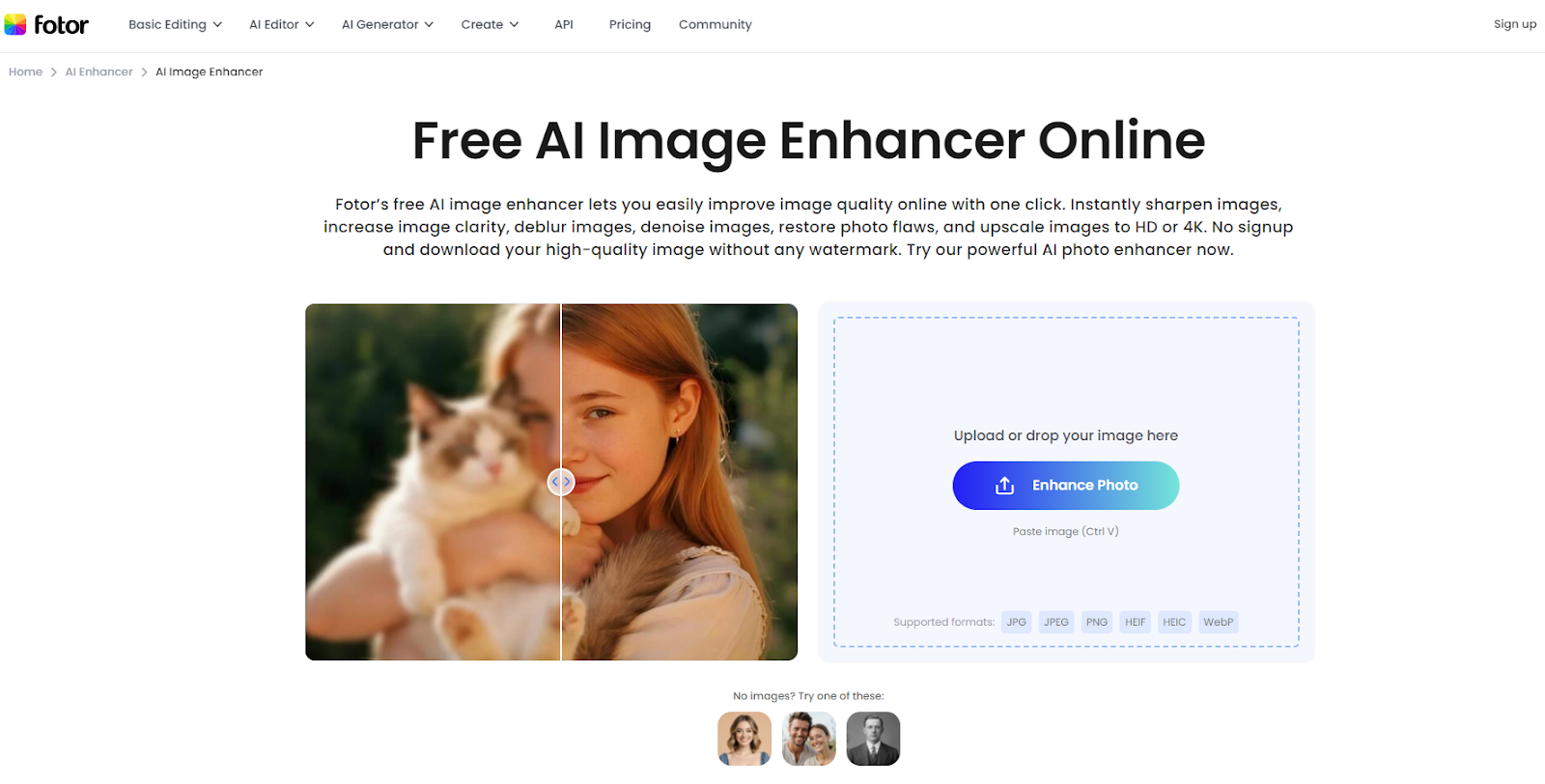
In today’s visual-first digital landscape, brands depend on crisp, high-quality images to capture attention and build trust. Research consistently shows that clear, appealing visuals can significantly influence purchasing decisions. Simply put, better images often lead to better sales. Fotor offers an AI-powered image enhancement tool that quickly improves image quality. Reviews often highlight it as a reliable option for everyday creators. Briefly, it repairs blurred or low-quality images and transforms them into high-resolution images.
It automatically works on more basic problems such as underexposure, blur, noise, and pixelation. That is, you can post a picture and have the artificial intelligence do the hard work. You publish the picture, and the AI process works, and you get the enhanced image. Briefly, novices can immediately boost image quality and make their visuals appear professional without a photoshoot or spending money on software. It can dramatically refine creative images.
Key Features of Fotor’s Photo Enhancement Tool
Tools like Fotor are often mentioned as one of the best ai image enhancer options for creators who want quick, high-quality results without manual editing.
Key features include:
- Sharpen & Clarify: Automatic sharpening of edges, as well as improved contrast, will make blurred or slightly out-of-focus images clearer. It also balances lighting and exposure to achieve a natural lighting look.
- Denoise and Deblur: Removes grain and visual noise in low-light shots or aged images, and gives you better and more professional looks. In practical use, this allows users to easily unblur image content and achieve clearer, more professional-looking results.
- Upscale Resolution: Supports one-click HD and 4K upscaling. The AI completes the missing information in an intelligent manner, and it does not pixelate images when making them larger. It implies that small and low-res photos can be transformed into high-res graphics.
- Restore Old Photos: Restores damaged and lost images. The tool is capable of eliminating scratches, reinstating lost details as well as reanimating old photographs. Their use is helpful in digitizing family photos or archival materials.
- Batch Processing/ API: You are able to edit a large number of images simultaneously or you can use the API to add photo enhancement to your site/application. This accelerates operations such as internet commerce listing images or posts on social media.
- Free and Mobile-Friendly: The tool is completely mine-free online. It also possesses a companion mobile application, hence you can improve pictures on the go. (Higher resolutions and advanced output require upgrading to Pro, as noted below.)
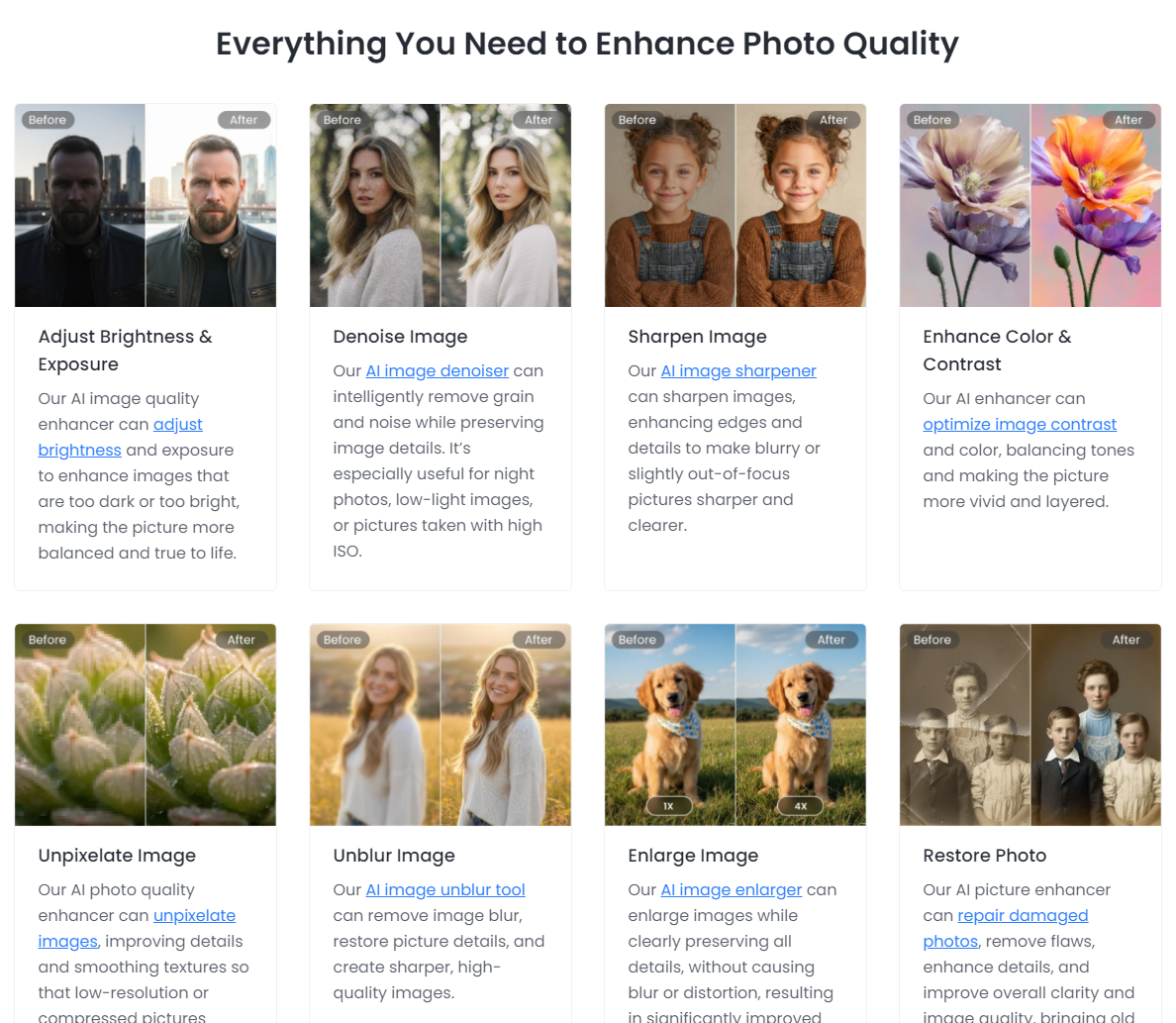
Together, these features mean you have an all-in-one image fixer. You can drop in a product shot and get a crisper, more vibrant photo; upload a group selfie and remove noise/blur; or quickly boost a marketing graphic’s saturation – all within one interface. The AI handles the technical side, so you can focus on content.
It’s not just for artistic fixes – it restores real photos too. Its AI can “repair damaged photos, remove flaws, enhance details, and improve overall clarity”. This capability helps businesses digitize and reuse heritage images or lets casual users clean up imperfect vacation shots. The result is clear, natural-looking images ready to impress viewers.
How Fotor’s AI Enhancer Works (in 3 Easy Steps)
It’s straightforward to use it online:
- Upload Your Photo: It is a web-based tool that lets you upload images without installing software or registering. Common formats such as JPG and PNG are supported.
- One-Click Enhancement: AI will automatically enhance our picture, improving brightness/exposure and blur or noise detection, and automatically sharpening clarity, color and details. It does not require you to play with the settings, and the intelligent algorithm does the work.
- Get the Result: The image is improved in a few seconds, which you can get. All one has to do is preview and download the HD/4K version (free users usually receive the watermark-free results). It is quick and fluid, and even the bad quality snaps appear to be refined.
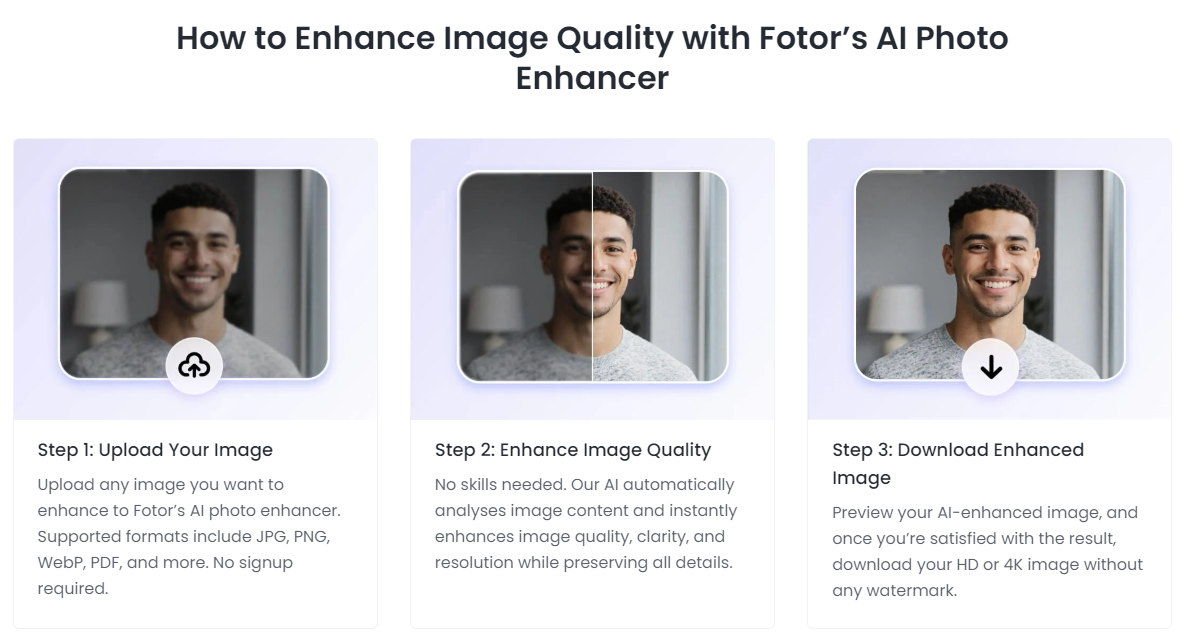
This workflow is as easy as it sounds. User feedback shows that uploading an image and waiting 10–15 seconds yields a result that looks cleaner, clearer, and far more professional”.
How Better Images Boost Brand Perception and Conversions
High-quality images do more than look good – they strengthen a brand and drive sales. Studies show that professional pictures build trust and engagement. Recent industry data from Squareshot indicates that professional-grade visuals can increase conversion rates by as much as 30% to 33% compared to low-quality ones.
Brands can secure these advantages by using AI-enhanced image improvement. By enhancing the quality of marketing images, products gain a more attractive look, which may positively impact customer interaction and purchase. Consequently, advertisements, social media updates, and online shop entries are enhanced in visual appeal through the use of AI.
- Get Customer Attention: Bold, colorful photos are attention-grabbing. Research indicates that consumers base their purchase decisions on a product’s appearance.
- Boost Sales: Quality photos directly translate into sales. By automatically improving image quality, it helps ensure your visuals work harder at turning visitors into buyers.
- Reinforce Brand Trust: High-quality pictures convey a professional, careful impression. Studies from organizations like Adobe suggest that 38% of users will stop engaging with a website if the content or layout is unattractive. It can be on your social media or on your site, but by fixing the lighting, color, or sharpness, you would be sure that all photos portray your brand in a positive light.
In short, AI-based image enhancement can play an important role in a brand’s visual strategy. Instead of hiring a professional photographer for every update, brands can apply professional-looking adjustments in seconds. This makes it easier to maintain consistent, high-quality visuals across e-commerce listings, social media, and other digital channels.
Why Fotor Is Ideal for Casual Users
Simplicity is the key benefit for a common user. It does not require any technical expertise, design experience, or learning curve. By bringing up vacation photos, social media posts, profile pictures, and so on, you can see tangible improvements in a few clicks.
The easy-to-use interface lets users drop an image and have the AI handle sharpening, lighting, color correction, and noise reduction. The free version allows one to easily test the tool, whereas paid features enable downloading in higher resolution and other features.
Pricing and Plans
Fotor offers a generous free tier and optional paid upgrades.
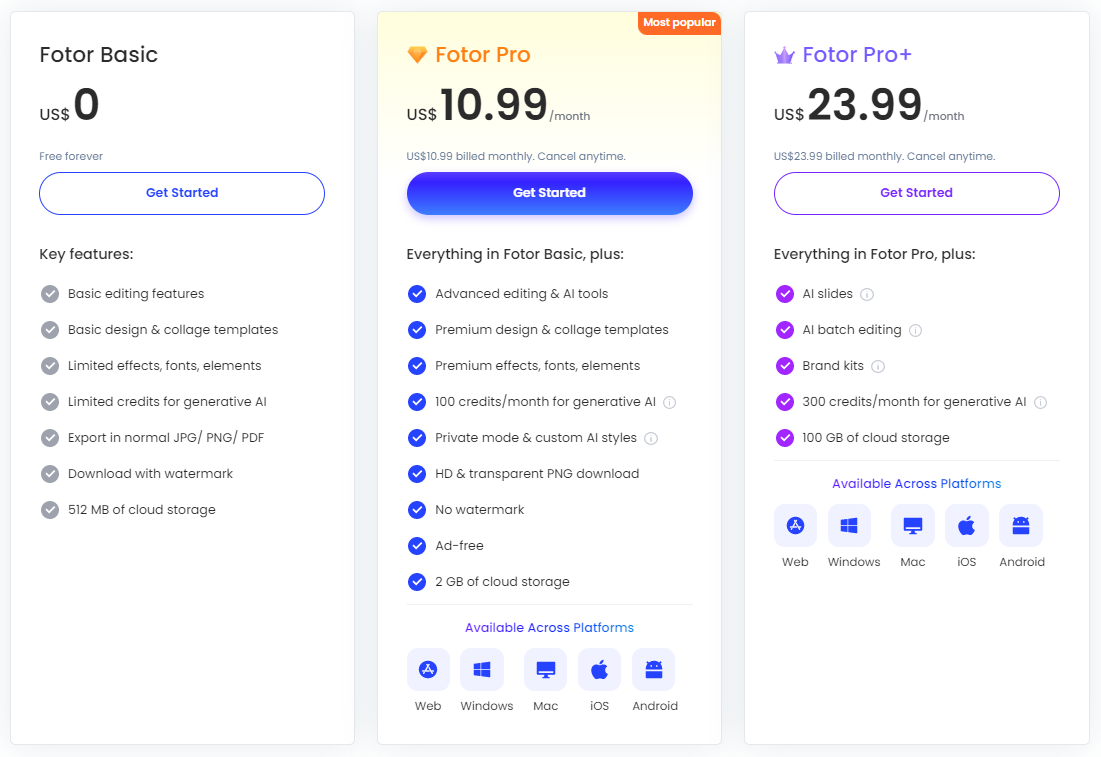
- Basic (Free): The plan is free and includes most core functions. Includes core enhancement tools, basic editing features, and access to templates. Downloads include watermarks, resolution is limited, and cloud storage is capped at 512 MB. Basic (around $3.99/month billed annually).
- Pro Plan: All the content of Basic with added advanced and AI editing features, high-quality and PNG downloads, and premium templates and effects. More importantly, Pro is watermark-free and advertisement-free. There is also 2 GB of cloud storage and additional monthly AI credits. As a point of reference, the Pro plan costs $10.99/month or $47.99/year.
- Pro+ (approximately 23.99/ month or 99.99/ year) – Incorporates all Pro features, as well as batch editing (edit photos simultaneously), AI Slides and Write features, brand kits, and 100 GB storage. This level increases the AI credit (300/month) under widespread generative consumption.
Concisely, Basic (free) is a basic usage with watermarked output, whereas Pro is limitless and provides high-quality, watermark-free output. The premium plans are cross-platform (they operate equally on the web, Windows, Mac, iOS, and Android).
Bottom Line
Visual quality is one of the important aspects of branding and customer interaction nowadays. Fotor’s AI image enhancer provides a convenient way to enhance any picture, whether a product or a personal photo, without any hassle. It automates processes such as denoising, sharpening, and upscaling that would otherwise require professional expertise. The outcome is always improved images that attract and create trust. According to various sources, the more attractive the image, the more conversions and a stronger brand image it generates. It provides a fast and effective way to enhance images for both personal and professional use.





