A business model canvas looks simple on paper. You need to create nine blocks on a page and add a clear picture of how your business works. But the moment you sit down to fill it out properly, you realize how much thinking and research is required behind each block.
Most people skip that work. They write something quick, move on, and end up with a canvas that looks complete but falls apart the moment someone asks a hard question about it.
AI tools have changed how much of that groundwork you actually have to do yourself. This guide walks through how to use AI tools to create and visualize a business model canvas.
What a Good Business Model Canvas Actually Looks Like?
A good business model canvas comes down to two things working together: the quality of the strategy content in each block and the way the canvas is designed and presented.
Both matter equally. Strong content in a messy, hard-to-read layout will most likely get ignored. Similarly, a beautifully designed canvas with vague, generic entries serves no purpose.
Here’s what you need to consider while adding business details:
| Block | Weak Version | Strong Version |
| Value Proposition | We help businesses grow | We cut procurement time by 40% for mid-size manufacturers using automated supplier matching |
| Customer Segments | SMBs | Operations managers at manufacturing companies with 50–500 employees |
| Customer Relationships | Good customer service | Dedicated onboarding manager for the first 90 days, then a self-serve portal with live chat support |
| Channels | Online and offline | Direct sales team + LinkedIn outbound + partner referral network |
| Revenue Streams | Subscriptions | Monthly SaaS subscription ($299/mo) + one-time implementation fee for enterprise onboarding |
| Key Activities | Building the product | Supplier database management, AI matching algorithm development, and enterprise integrations |
| Key Resources | Our team and technology | Proprietary supplier dataset, engineering team of 12, cloud infrastructure on AWS |
| Key Partners | Suppliers and vendors | ERP integration partners (SAP, NetSuite) + logistics data providers |
| Cost Structure | Salaries and software | Engineering salaries (60%), cloud infrastructure (20%), sales and marketing (15%), legal and compliance (5%) |
A well-designed business model canvas:
- Uses visual hierarchy to present information clearly. The Value Proposition block sits at the center of the canvas for a reason, and the design should reflect that with size, color, or emphasis.
- Color-codes blocks by category so the reader can immediately distinguish customer-facing elements from operational ones from financial ones.
- Keeps text in each block short and scannable.
- Uses consistent typography and spacing so nothing feels cluttered or hard to follow.
How to Create a Business Model Canvas With the Help of AI
Step 1: Build the strategy content
Before you start filling the blocks, use AI tools like ChatGPT, Claude, or other dedicated AI business strategy tools to do the groundwork.
Feed your business idea and ask it to map how similar companies operate, what problems they solve, and how they make money.
Add value proposition and customer segments
These two blocks set the direction for everything else, so they deserve the most attention.
Most people write something generic here, such as “We help businesses save time,” and move on. The goal is to get specific. Who exactly are you helping? With what outcome? Compared to what alternative?
Try this prompt in an AI tool like:
“I am building [describe your product or service]. Analyze the top competitors in this space, how they position their value proposition, and where their solutions fall short. What gap could a new entrant realistically own?”
For customer segments, push past broad categories. “SMBs” is not a segment. Operations managers at mid-size manufacturing companies with a procurement problem.
Ask AI to help you get there:
“Who is the most underserved customer in [your industry]? Describe them by job title, company size, key frustration, and what they are currently using to solve the problem.”
Map your operations with competitive intelligence
Key Activities, Key Resources, and Key Partners tend to get rushed. But this is where investors look when they want to know if you actually understand how your business works.
Look at how companies in your space actually operate and how their business model is structured.
Think:
- What activities do they invest in heavily?
- What do they own versus outsource?
- Who do they rely on to deliver their value proposition?
Stress-test revenue streams and cost structure
A canvas that says “subscriptions” under Revenue Streams and “salaries” under Cost Structure is not a strategy. These two blocks need to answer one question together: Does the money actually work?
Look at your value proposition and ask: what would a customer reasonably pay for this outcome? Then look at your key activities and ask: what does it actually cost to deliver that?
Connect the blocks
Once all nine blocks are filled, read the canvas as a system.
- Does your value proposition match your customer segment?
- Do your key activities support what you are promising?
- Does your revenue model require capabilities you have not listed anywhere?
A quick way to do this is to go block by block and ask “so what?” after each entry.
For teams who want to do all of this without starting from scratch, Vizologi is built specifically for this layer. It is an AI-powered business strategy tool that combines competitive intelligence, market analysis, and real business model data to help you populate all nine blocks with actual substance.
Some of its most useful features include:
- IdeAI Generator: Generates business ideas and value proposition directions from just two keywords, useful when you are still pressure-testing your core concept
- Business Intelligence: Pulls market analysis, competitive intelligence, and sector trends so your canvas is grounded in real data
- Mash-up Method: Lets you combine strategies from different companies to shape an original model, particularly useful for Revenue Streams and Value Proposition blocks
- Canvas Library: Offers thousands of real company canvases mapped across sectors, so you can see how businesses similar to yours have structured their models
The Anthropic Business Model Canvas on Vizologi is a good example of what a fully researched canvas looks like in practice. It has specific entries across every block, from key partners to revenue streams to value propositions. Worth studying before you build your own.
Step 2: Turn your canvas into a visual that communicates your business model
Once your nine blocks are populated with solid content, the next job is presentation. Most people export a plain PDF or paste everything into a Word doc and call it done. Neither works well when you are sharing with investors, clients, or stakeholders who are seeing your business for the first time.
AI design tools have made this step significantly faster. You do not need a designer or hours in PowerPoint to produce something that looks credible and communicates clearly.
Use an AI design tool to build the visual structure
Building a canvas from scratch takes more time than most people expect. Adding boxes, adjusting text, getting layout proportions right, applying colors, and finding the right icon add up fast it adds up fast, especially if you are not a designer.
AI graphic design tools solve this.
Venngage is particularly useful here. It is a visual communication platform built for creating business reports, presentations, and business model canvases.
It has dedicated Business Model Canvas templates built specifically for business communication.
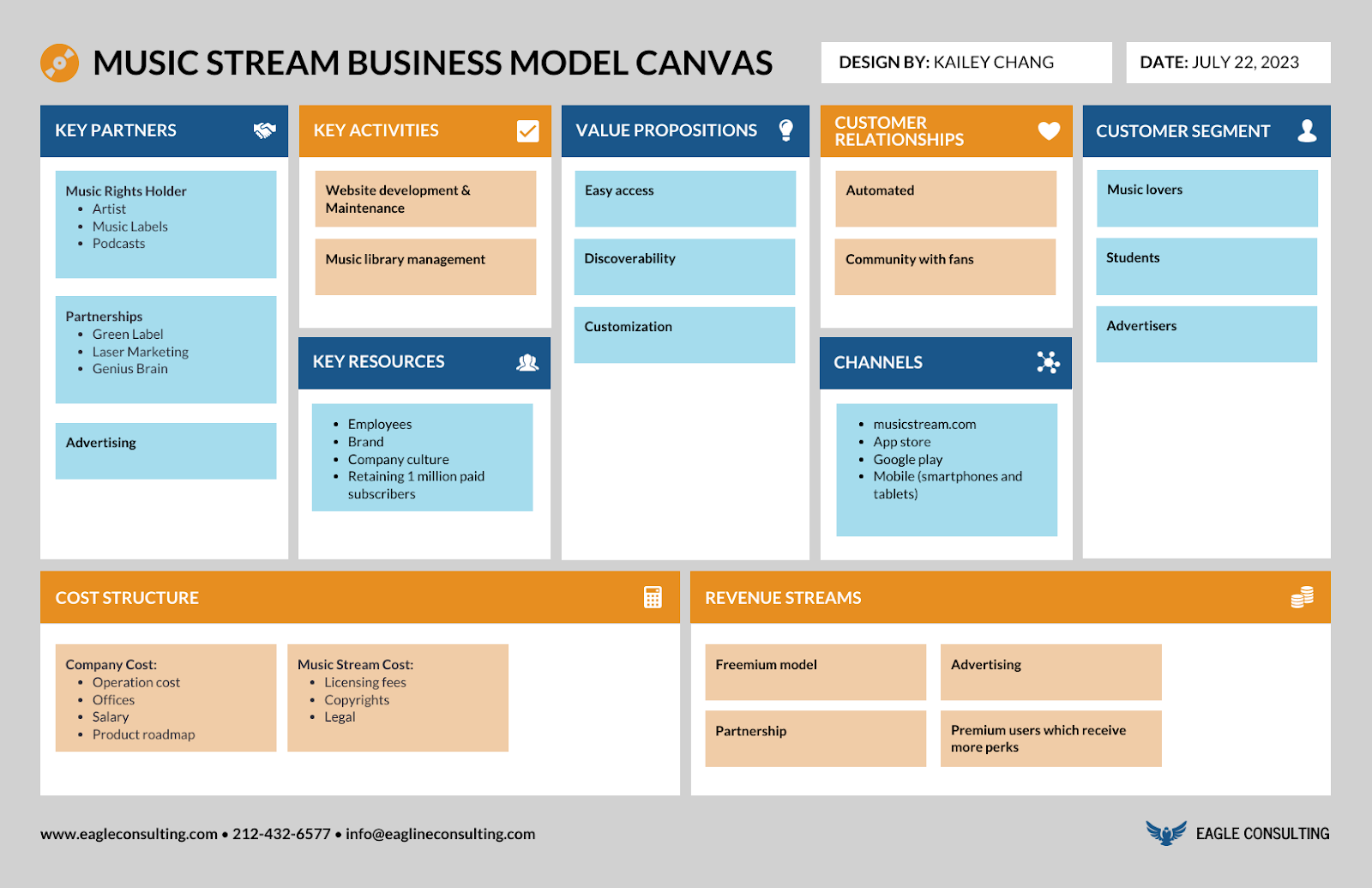
You can easily edit them using AI. Select a business canvas model template, add a text prompt to edit with AI, and customize the design.
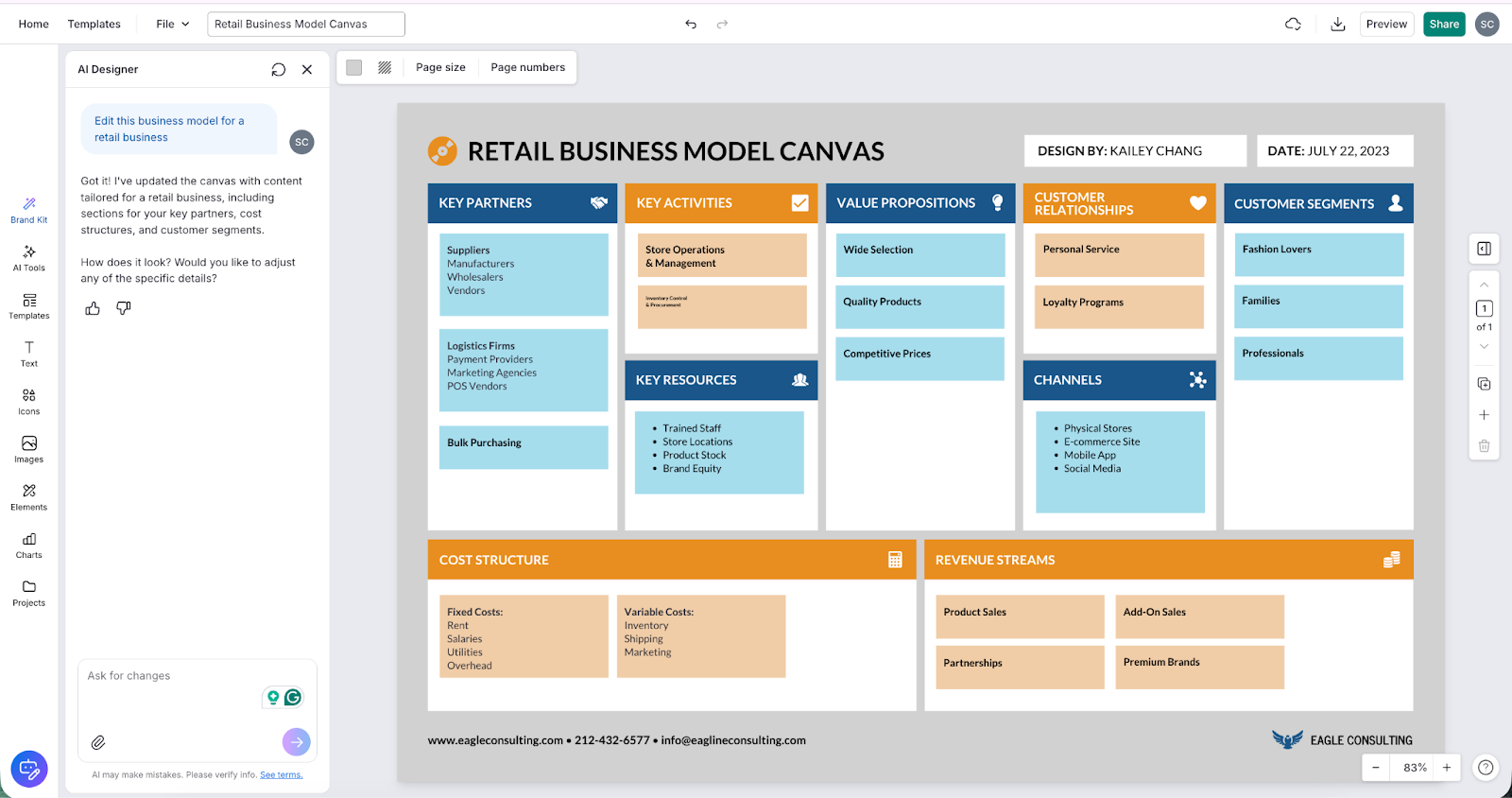
The drag-and-drop editor makes it easy to move blocks around, resize sections, change fonts, and swap icons from Venngage’s built-in library.
Export in the right format for your audience
The same canvas should not look identical in every context. For example, an internal workshop needs something editable and collaborative, whereas for an investor meeting, you need a polished visual.
| Format | Best For |
| Interactive digital canvas | Team workshops, live strategy sessions |
| Infographic PDF | Investor presentations, client proposals |
| PowerPoint slide | Board meetings, stakeholder briefings |
| PNG or SVG | Embedding in reports, pitch decks, websites |
With Venngage, you can export the same canvas across multiple formats, including PDF, PNG, and PowerPoint, so the content you built once works across every context you need it in.
Step 3: Validate and iterate
Markets shift, customer needs change, and assumptions you made on day one will not all hold up once you start testing them in the real world. That’s why you need to update your business model canvas periodically.
This is where AI makes iteration significantly less tedious. Instead of rebuilding the canvas from scratch every time something changes, you update the relevant block and use AI to check what else needs to shift as a result.
Change your customer segment, and AI can flag whether your channels, value proposition, and revenue streams still make sense. Add a new revenue stream, and it can surface what new activities or resources are required.
A few triggers that should prompt a canvas review:
- You are entering a new customer segment or market
- Your pricing model changes
- A key partner relationship falls through
- A competitor moves in a direction that affects your value proposition
- You are preparing for a funding round and need the model to reflect the current reality
Think of the canvas as a living strategy document. The teams that get the most out of it are the ones that keep it current rather than the ones that built the best first version.
Who Should Use AI to Build a Business Model Canvas
AI-powered canvas tools are not just for startups figuring out their first business model. The use cases are broader than most people assume.
| Who | Why AI Changes the Game |
| Startup founders | Validates assumptions before committing to a full business plan or raising capital |
| Business consultants | Maps client models fast and produces polished, presentation-ready deliverables without the manual research overhead |
| Business designers and strategists | Explores model combinations using real company data rather than working from theory |
| MBA students and academics | Studies real-world cases across sectors as live case studies rather than textbook examples |
| Marketing directors | Analyzes competitor models to sharpen positioning and identify gaps in the market |
| Innovation teams | Tests new business model hypotheses quickly without heavy investment in research or design |
Whatever your role, the underlying value is the same. These tools lower the barrier between having a business idea and having a clear, well-researched, well-presented model that other people can actually evaluate. The thinking still has to be yours. AI just removes the parts that slow most people down before the thinking even starts.
Frequently Asked Questions
1. Can AI generate a complete business model canvas automatically?
Yes. AI strategy tools can auto-populate all nine blocks using competitive data, market intelligence, and your business inputs. Tools like Vizologi pull from thousands of real company strategies to give you a research-backed starting point across every block. Treat the output as a strong first draft that you refine and validate.
2. What is the difference between a business model canvas and a business plan?
A business model canvas is a one-page strategic snapshot of how your business creates, delivers, and captures value. A business plan is a longer document that includes financial projections, operational details, and a narrative.
3. Do I need design skills to visualize my business model canvas?
No. AI design tools like Venngage handle the visual layer for you. Templates, layout, color hierarchy, icons, and readability checks are all built in. You focus on the strategy content, and the tool handles the presentation. The output looks professional without any design experience required.
4. How often should I update my business model canvas?
Revisit it whenever something material changes, such as a new customer segment, a pricing pivot, a new revenue stream, or a shift in your competitive landscape.
5. What are the nine blocks of the Business Model Canvas?
The nine blocks are Customer Segments, Value Proposition, Channels, Customer Relationships, Revenue Streams, Key Activities, Key Resources, Key Partners, and Cost Structure. Value Proposition sits at the center; it is the block everything else connects to and is shaped by.
Create a Business Model Canvas with AI
Working on a business model canvas involves doing the strategy work properly and then presenting it in a way that communicates clearly to the recipient.
AI has made both of those things significantly more accessible. The research layer — competitive intelligence, market analysis, stress-testing your assumptions — no longer requires days of manual work. Tools like Vizologi handle the groundwork so you can focus on strategic thinking rather than information gathering. And once the strategy content is solid, tools like Venngage handle the visual layer.
The canvas framework itself has not changed. What has changed is how fast you can execute it, how much real intelligence you can bring to it, and how clearly you can present it when it matters.