One WhatsApp number works well when a business has a small team and a manageable number of customer conversations.
But what happens when the company adds a sales number, another for order updates, and more employees to handle incoming inquiries?
Suddenly, the challenge is not sending messages. It is knowing who owns each conversation, what the customer has already been told, and what needs to happen next.
This is where businesses often start comparing WhatsApp senders, shared inboxes, and CRM systems.
The right choice depends on the work your team needs to coordinate—not simply the number of WhatsApp messages it sends.
The Real Challenge Behind Multiple WhatsApp Numbers
In an October 2026 Reddit discussion, a poster described a custom furniture and home decor business struggling to coordinate customer conversations across three WhatsApp numbers and six employees.
According to the post, the business used separate numbers for general communication, sales, and order updates or support.
Most new inquiries reportedly came through Instagram, Facebook advertising, and organic social media.
The team wanted to see conversations in one place, assign inquiries to employees, track leads, and connect customer messages with quotes and payment information.
Mobile access was another requirement because some employees worked in a showroom or warehouse rather than sitting at a desk.
These details were self-reported, not independently verified business data. Still, the situation illustrates a useful distinction.
A business can add numbers and employees without creating a process for sharing customer information.
When that happens, people may respond to the same inquiry, overlook a promised follow-up, or struggle to find the latest quotation.
A different messaging tool will not necessarily solve those problems.
First, the business needs to identify which part of its workflow is missing.
WhatsApp Sender, Shared Inbox, or CRM: Which Problem Are You Solving?
Although these tools all relate to WhatsApp communication, they serve different purposes.
| Tool | Best suited for | What it does not inherently provide |
|---|---|---|
| WhatsApp sender | Preparing personalized outbound messages for selected contacts | Shared conversation ownership or a sales pipeline |
| Shared WhatsApp inbox | Coordinating incoming conversations across employees | Complete sales, quoting, or order management |
| CRM | Tracking customer relationships, sales opportunities, and follow-up tasks | WhatsApp integration unless supported by the product |
A business may eventually need more than one of these.
For example, a retailer might use a shared inbox for customer service, a CRM for managing sales opportunities, and a separate sender for preparing relevant outbound updates.
The important distinction is between message delivery, conversation coordination, and customer relationship management.
Treating these as separate requirements makes it easier to choose software without paying for unnecessary features.
When a WhatsApp Sender Is Enough
Consider a furniture retailer that has collected requests from customers who want to know when a particular collection is back in stock.
The business already has an Excel spreadsheet containing customer names, phone numbers, and relevant product interests.
Employees do not need to assign new leads or manage a complex sales pipeline.
They need to prepare accurate outbound messages and keep track of the sending task.
In this situation, a WhatsApp Sender such as WA Bulk Message Sender can help with Excel contact imports, personalized messages, supported media attachments, sending intervals, progress monitoring, and result exports through WhatsApp Web.
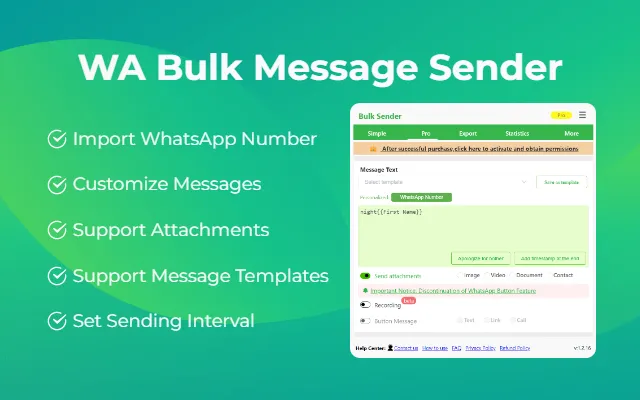
Instead of entering each recipient’s information separately, employees can prepare the relevant message details using their existing contact list.
This is a focused operational use case.
The extension helps organize outgoing messages, but it does not automatically combine three separate WhatsApp numbers into a shared inbox, assign conversations to sales representatives, or synchronize a complete customer history with a CRM.
Businesses must also respect recipients’ communication preferences and follow applicable WhatsApp policies. A third-party browser extension does not guarantee unrestricted messaging.
A sender is a reasonable choice when the audience and message purpose are already clear, and the main problem is preparing the outbound task.
When a Shared Inbox Becomes More Important
Now consider a different situation.
A customer asks about a custom dining table through the sales number. An employee provides an estimate.
Three days later, the customer contacts another business number to ask whether the dimensions can be changed.
The second employee may not know what was previously discussed.
Even though the business has several employees available, the conversation becomes difficult because customer context is fragmented.
A shared inbox can help address that problem if it supports the company’s WhatsApp setup.
Before choosing one, businesses should verify several essential capabilities.
| Requirement | What to test |
|---|---|
| Multiple numbers | Can the system connect all required WhatsApp numbers? |
| Conversation assignment | Can an employee take ownership of an inquiry? |
| Shared history | Can authorized colleagues access relevant past conversations? |
| Reassignment | Can conversations move between sales and support? |
| Mobile functionality | Can employees complete necessary tasks on their phones? |
| Customer identification | Can the system recognize the same customer across relevant channels? |
These features must be verified individually.
A platform that supports multiple employees on one number does not necessarily support several independent numbers in the same inbox.
Likewise, a system offering desktop access may not provide equivalent functionality on mobile.
For businesses whose employees frequently move between customer-facing and operational roles, these distinctions can determine whether the software is practical.
When Does a CRM Become Necessary?
A shared inbox can improve communication visibility, but it may not provide enough structure to manage a sale from beginning to end.
Custom furniture is a useful example because a single order can involve several stages:
Inquiry ? Requirements ? Quotation ? Revision ? Approval ? Payment ? Fulfillment
At each stage, the business needs more than the latest chat message.
It may need to know which salesperson owns the opportunity, what price was approved, whether the customer requested a revision, and which action remains outstanding.
A CRM can help organize this information through customer records, sales stages, assigned responsibilities, and follow-up tasks.
However, these are general CRM capabilities.
Not every CRM automatically captures WhatsApp conversations, supports multiple business numbers, or connects to an existing accounting system.
A company should therefore evaluate the actual integration, not just the CRM’s advertised feature list.
For example, if employees still need to copy customer information manually from WhatsApp into the CRM after every conversation, the software may create an additional administrative task.
The goal should be to improve the continuity of customer information, not simply introduce another place to store it.
Could WhatsApp Business Already Be Enough?
Before adopting additional software, small teams should review the features available through WhatsApp Business itself.
The WhatsApp Business App supports linked devices, allowing a business number to be accessed through additional supported devices.
Meta’s documentation describes support for up to four linked devices under the standard arrangement, with expanded device limits and certain chat-assignment capabilities available through eligible Meta Verified plans.
For a small team sharing one number, those features may address some collaboration needs.
But linked-device access to one account is not equivalent to consolidating several separate business numbers into a single customer-management system.
A business managing three numbers should still investigate how each number will connect, whether conversation histories remain accessible, and which employees can work across them.
The official WhatsApp Business Platform offers APIs for connecting messaging to business applications, but the API itself is not a ready-made CRM or shared inbox.
Those interfaces and workflows depend on the software and integrations built around it.
This is why businesses should evaluate their existing setup before assuming they need to replace it.
Is One All-in-One Platform Better Than Several Connected Tools?
An all-in-one WhatsApp CRM can sound appealing.
The business gets one interface for conversations, leads, quotes, orders, and customer records.
But the convenience of one platform depends on how well its individual functions work.
A product might have an excellent shared inbox but limited quotation features. Another might provide a strong sales pipeline while making multi-number WhatsApp management difficult.
Before choosing an all-in-one solution, ask whether all required workflows can be completed without awkward workarounds.
If the company’s existing accounting software already handles invoices and payments effectively, replacing it may not be necessary.
A connected approach could look like this:
- The shared inbox manages incoming customer conversations.
- The CRM maintains sales opportunities and follow-up tasks.
- The accounting or order system manages invoices and fulfillment.
- A sender supports suitable outbound messaging tasks.
This is not automatically better than one integrated platform.
The decision depends on integration quality, total cost, employee experience, and the amount of manual work required.
The objective is not to use the fewest applications. It is to make information move reliably between the people and systems that need it.
How to Choose the Right Setup Before Buying Software
For a growing team, a short operational test can reveal more than a long feature comparison.
Step 1: Map One Real Customer Journey
Select a typical inquiry and document the stages from first contact to completed order.
For example:
Facebook Ad ? WhatsApp Inquiry ? Sales Assignment ? Quote ? Follow-Up ? Payment ? Delivery
Identify which employee or system is responsible for each stage.
Step 2: Find Where Information Gets Lost
Look for recurring problems such as duplicate replies, unclear customer ownership, missed follow-ups, or quotation details stored outside the conversation.
This identifies whether the primary need is a sender, shared inbox, CRM, or system integration.
Step 3: Test the Actual Number Configuration
Do not rely on a demonstration that uses only one WhatsApp number if the business needs three.
Ask the provider to connect the intended setup, subject to available trial and account requirements.
Confirm whether employees can move between relevant conversations while maintaining the necessary customer context.
Step 4: Include Mobile Employees in the Trial
Test the system with people who work in the showroom, warehouse, or other locations.
Can they see the right customer information? Can they take responsibility for a conversation? Can they record the next action without returning to a desktop computer?
A solution that works only for office employees may not fit the entire team.
Step 5: Compare Operational Results
Choose a small set of measurable indicators before adopting the new workflow.
| Indicator | What improvement would mean |
|---|---|
| Unassigned inquiries | Fewer conversations without a responsible employee |
| Missed follow-ups | Fewer overdue customer actions |
| Duplicate responses | Less confusion between employees |
| Manual data entry | Fewer repeated transfers between systems |
| Quote turnaround | More consistent handling of customer requests |
These are evaluation criteria, not guaranteed outcomes.
Businesses should compare actual results with their previous workflow rather than relying on projected efficiency claims.
Frequently Asked Questions
Can a WhatsApp sender replace a CRM?
No. A WhatsApp sender primarily helps prepare and manage outgoing messages. A CRM organizes customer relationships, sales opportunities, and associated tasks.
Does a business need a CRM when it adds a second WhatsApp number?
Not necessarily. The business may only need better access and assignment processes. A CRM becomes more relevant when ongoing customer records, sales stages, and coordinated follow-ups are difficult to manage.
Can one shared inbox manage three WhatsApp numbers?
Some providers support this, but availability depends on the product, WhatsApp connection method, and plan. Businesses should test the specific number configuration before subscribing.
Is an all-in-one WhatsApp CRM always the best option?
No. A combination of connected tools may be more suitable when the business already has reliable accounting, order-management, or customer-management systems.
The Right WhatsApp Setup Depends on How Your Team Works
Growing from one WhatsApp number to several does not automatically mean a company needs a more expensive CRM.
The first question should be what employees are struggling to manage.
If the challenge is preparing relevant outbound messages, a sender may be sufficient.