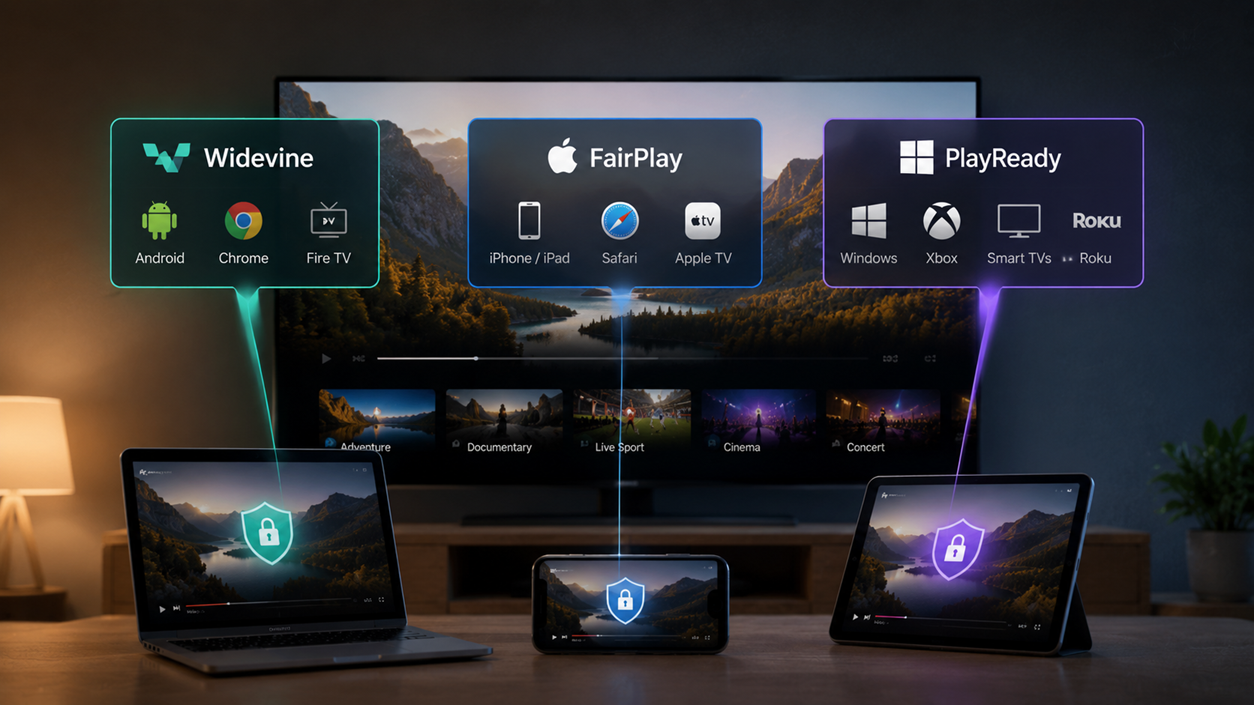
Most video teams assume Widevine plus FairPlay equals full multi-DRM coverage. That assumption holds for mobile and desktop browser audiences. It breaks the moment any viewer lands on a Samsung smart TV, an LG webOS panel, a Roku device, or an Xbox.
If your platform skips PlayReady, it is not running multi-DRM. It is running two-DRM with a quietly significant coverage gap.
The three systems are owned by three different platform companies, and that ownership is what determines their reach. Widevine is Google’s content protection standard; it is the default DRM for Android and every Chromium-based browser.
FairPlay Streaming is Apple’s system; it works exclusively within the Apple ecosystem, from iOS and iPadOS to macOS Safari and Apple TV. PlayReady is Microsoft’s standard, active since 2007, and it is the DRM that Samsung, LG, Roku, and Microsoft itself have built into their connected TV and Windows platforms.
Because each company controls its own hardware and software stack, there is no single DRM that spans all three groups. A multi-DRM implementation is not a preference; it is a structural requirement of the device landscape.
The practical complication is that PlayReady is frequently underestimated. It is sometimes treated as a legacy Microsoft technology from the Windows Media era, a system you add as an afterthought if a Windows audience materializes. That framing is wrong.
PlayReady is the active, primary DRM for a device segment that includes the majority of smart TV platforms sold today, all Xbox consoles, Roku, and most set-top boxes. Platforms that have not deliberately accounted for it have a gap, not a simplification.
This article gives you the device coverage matrix across 17 platforms, a security architecture comparison covering encryption modes and hardware enforcement tiers, and a decision framework mapped to six audience types, so you can confirm exactly which combination your stack requires and when adding the third system becomes necessary.
Quick answer:
Widevine covers Android, Chrome, Firefox, and Amazon Fire TV. FairPlay covers every Apple device, Safari, and Apple TV. PlayReady covers Windows, Xbox, Samsung smart TVs, LG webOS, and Roku. No single system spans all three groups. Most platforms need at least two; platforms distributing to smart TVs or Xbox need all three.
Key Takeaways
- Widevine is Google’s DRM. It covers Android, Android TV, Chrome, Firefox, Edge (Chromium), Amazon Fire TV, and Chromecast.
- FairPlay is Apple’s DRM. It covers iOS, iPadOS, macOS Safari, tvOS (Apple TV), and nothing else.
- PlayReady is Microsoft’s DRM. It covers Windows desktop apps, Xbox One and Series X/S, Samsung Tizen smart TVs, LG webOS smart TVs, Roku, and most set-top boxes.
- Widevine and FairPlay together cover the large majority of mobile and desktop browser sessions. PlayReady becomes a hard requirement the moment distribution extends to smart TVs, Xbox, Roku, or Windows-native applications.
- Use the device coverage matrix below to map your specific audience to the correct two- or three-DRM combination.
Origins and Ownership: Who Controls Each DRM System
Understanding who owns each DRM system matters because ownership determines platform availability, licensing access, and integration path. Each of the three systems belongs to a different platform company, which is why no single system covers all devices.
1. Widevine DRM
Widevine is Google’s content protection system. Google acquired Widevine Technologies in 2010 and integrated the technology as the default DRM for Android and Chromium-based browsers.
Widevine operates at three security levels:
- L1 requires hardware enforcement through a Trusted Execution Environment (TEE), where decryption and rendering occur within secure hardware; this level is required under Motion Picture Association (MPA) licensing for 4K Ultra HD content.
- L2 uses hardware for decryption but not content rendering.
- L3 relies on a software-only Content Decryption Module (CDM) and is sufficient for SD and HD content in non-studio contexts.
Chrome desktop, notably, typically operates at L3 because most consumer laptops do not include a TEE. Widevine is delivered to browsers through the Encrypted Media Extensions (EME) API.
2. FairPlay DRM
FairPlay is Apple’s content protection system, launched as FairPlay Streaming (FPS) in 2015. FairPlay is exclusive to Apple platforms and operates through the AVFoundation framework.
It uses AES-128 encryption in CBC mode (CBCS), and Apple controls certificate issuance directly. On Apple devices with Secure Enclave hardware, FairPlay provides hardware-enforced key protection equivalent to Widevine L1.
FairPlay does not work on any non-Apple device or browser, including Chrome on Mac. Safari is the only desktop browser through which FairPlay can be delivered.
3. PlayReady DRM
PlayReady is Microsoft’s content protection system, launched in 2007 as the successor to Windows Media DRM, and licensed through the PlayReady Licensing Program.
PlayReady SL3000 is its hardware-enforced tier, equivalent to Widevine L1, using a TEE for decryption and rendering. SL2000 is a software-enforced tier sufficient for standard HD content.
Per Microsoft’s PlayReady documentation, PlayReady is deployed across more than 4 billion devices as of 2023. That figure reflects its deep integration into smart TV operating systems, game consoles, and set-top box platforms that neither Google nor Apple has addressed.
Device Coverage Matrix: Which DRM Works on Which Platform
The table below is the central reference for stack decisions. Use the “Minimum DRM Stack” column to identify the baseline for your audience.
DRM comparison chart: Platform coverage across Widevine, FairPlay, and PlayReady
| Platform / Device | Widevine | FairPlay | PlayReady | Minimum DRM Stack |
| Android / Android TV | Yes | No | No | Widevine |
| iOS / iPadOS | No | Yes | No | FairPlay |
| Chrome (desktop, all OS) | Yes | No | No | Widevine |
| Safari (macOS / iPadOS) | No | Yes | No | FairPlay |
| Firefox (desktop) | Yes | No | No | Widevine |
| Edge (Chromium, Windows) | Yes | No | Partial | Widevine |
| Edge (legacy, Windows) | No | No | Yes | PlayReady |
| Windows desktop apps | No | No | Yes | PlayReady |
| Xbox One / Series X|S | No | No | Yes | PlayReady |
| Samsung Tizen (Smart TV) | No | No | Yes | PlayReady |
| LG webOS (Smart TV) | No | No | Yes | PlayReady |
| Roku (OS 9.2+) | No | No | Yes | PlayReady |
| Apple TV (tvOS) | No | Yes | No | FairPlay |
| Amazon Fire TV | Yes | No | No | Widevine |
| Chromecast / Google TV | Yes | No | No | Widevine |
| Set-top boxes (general) | Partial | No | Yes | PlayReady (primary) |
| PlayStation 4 / 5 | Partial / Varies | No | No | Widevine (partial support) |
According to Statcounter GlobalStats data from 2024, mobile and desktop browsers collectively account for the dominant share of global web traffic. Widevine and FairPlay together address that segment effectively.
The platforms where those two systems have no coverage, Samsung Tizen, LG webOS, Roku, Xbox, and Windows-native apps, represent a distinct and growing distribution surface that requires PlayReady specifically.
Security Architecture: What the Technical Differences Actually Mean
The technical differences between these three DRM systems affect three production decisions: which encryption mode you package content in, how many separate content versions you need to maintain, and whether your setup qualifies for MPA studio licensing on 4K content. Getting these decisions wrong before encrypting a library is expensive to reverse.
One often-overlooked implication of the CENC/CBCS split is that teams that encrypt a content library in CENC format before confirming their Apple audience size will need to re-encrypt the entire archive in CBCS to support FairPlay.
At a meaningful library scale, this is not a trivial re-packaging exercise. The reverse is also true. Setting up dual-track packaging from the initial ingest pipeline eliminates this risk entirely.
The comparison below maps each system across the dimensions that matter for implementation.
| Attribute | Widevine | FairPlay | PlayReady |
| Owner / Steward | Apple | Microsoft | |
| Top hardware security tier | L1 (TEE required) | Secure Enclave | SL3000 (TEE required) |
| Software fallback tier | L3 (CDM) | No hardware-free tier | SL2000 |
| Encryption standard | AES-128 CTR (CENC) | AES-128 CBC (CBCS) | AES-128 CTR (CENC) |
| Key delivery protocol | Widevine CDM / EME | FairPlay KSM | PlayReady license server |
| CMAF compatible | Yes | Yes (CBCS profile) | Yes (CENC profile) |
| Shared encryption with other DRM | Yes (with PlayReady via CENC) | No (separate CBCS package required) | Yes (with Widevine via CENC) |
| Offline playback support | Yes | Yes | Yes |
| MPA 4K hardware DRM approval | Yes (L1 only) | Yes (Secure Enclave only) | Yes (SL3000 only) |
| Open licensing | Restricted (device certification required) | Restricted (Apple certificate required) | Licensed program (PlayReady Licensing Program) |
CENC and CBCS: The Packaging Split That Matters Most
The most operationally significant technical point in this comparison is the difference in encryption modes between FairPlay and the other two systems.
Widevine and PlayReady both use AES-128 in CTR mode, which is the Common Encryption standard defined in ISO 23001-7 (CENC, or Common Encryption Scheme). Because both systems share the same encryption mode, a single CMAF (Common Media Application Format) or DASH (Dynamic Adaptive Streaming over HTTP) file encrypted once can be decrypted by either Widevine or PlayReady using separate license servers. You package the content once; you serve two DRM license responses.
FairPlay uses AES-128 in CBC mode (CBCS, or Cipher Block Chaining mode with sub-sample encryption). The difference in encryption mode means FairPlay cannot decrypt a CENC-encrypted file.
Teams running all three DRM systems therefore maintain two content assets: one CENC-encrypted track (served to Widevine and PlayReady clients) and one CBCS-encrypted track (served to Apple clients via HLS). This is standard practice in multi-DRM implementations using CMAF with HLS and MPEG-DASH delivery.
The practical implication: The CENC versus CBCS packaging decision must be made before encrypting a content library at scale. Repackaging a large archive is operationally expensive and requires retranscoding or re-encrypting the protected versions of every asset.
For 4K content under MPA studio licensing requirements, hardware-enforced DRM is not optional. MPA licensing for 4K Ultra HD requires Widevine L1 (TEE), FairPlay with Secure Enclave, or PlayReady SL3000 at the device level. Software-only implementations, including Widevine L3 and PlayReady SL2000, do not meet MPA requirements for premium 4K.
If your platform distributes studio-licensed 4K content, device certification and hardware DRM enforcement are requirements, not optimizations.
When You Need All Three, and When Two is Enough
For most mobile-first and browser-first platforms, Widevine and FairPlay together are the complete and correct DRM stack.
PlayReady becomes a hard requirement only when distribution extends to smart TVs, Xbox, Roku, or Windows-native applications.
The distinction matters because adding a third DRM system introduces real engineering overhead: a separate license server, updated routing logic, and, in some cases, additional packaging assets.
Three scenarios cover the full range of decisions most teams face.
Scenario 1: Widevine and FairPlay Only
A two-DRM stack of Widevine and FairPlay is valid, complete, and correct for eLearning platforms, SaaS products, and B2B marketing teams whose audiences access them via phones, tablets, and desktop browsers.
If your analytics confirm that your viewers are not on smart TVs, Xbox, Roku, or Windows-native apps, two-DRM is not a shortcut. It is the right answer.
An eLearning platform serving learners primarily on phones and desktop browsers can operate correctly with Widevine and FairPlay.
PlayReady is necessary only when a significant portion of learners access content through Windows-native apps, Xbox, or enterprise Windows environments that require hardware DRM.
DRM stacks scale incrementally. A team can implement Widevine and FairPlay today and add PlayReady when their distribution expands to smart TVs or Xbox.
The underlying CENC-encrypted CMAF package does not need to change; only the license server routing is updated. This means the decision is not permanently locked at launch.
Scenario 2: Adding PlayReady as the Connected TV and Xbox Trigger
PlayReady becomes a hard requirement as soon as distribution includes any of the following: Samsung Tizen smart TVs, LG webOS smart TVs, Roku, Xbox One or Series X/S, or Windows-native applications.
Samsung Tizen, LG webOS, Roku (OS 9.2 and above), Xbox One, Xbox Series X/S, and most set-top boxes use PlayReady as their primary DRM. Widevine and FairPlay do not cover these platforms.
The Roku active account figure illustrates the scale: according to Roku’s Q4 2023 earnings report, Roku had 80 million active accounts at the end of that quarter. Roku’s primary DRM is PlayReady.
Any platform that skips PlayReady has no content protection on Roku, regardless of how robust its Widevine and FairPlay implementations are.
Scenario 3: All Three Systems for OTT and Premium Broadcast
OTT operators, broadcasters, and premium VOD services distributing across the full device ecosystem need all three DRM systems.
Widevine covers Android, Amazon Fire TV, Chromecast, and the open-web browser layer. FairPlay covers the entire Apple ecosystem. PlayReady covers Windows, Xbox, and every major connected TV platform.
The multi-DRM comparison for a full-stack OTT deployment resolves to all three, without exception, if the platform targets any meaningful CTV or Windows audience.
Decision Framework by Audience Type
The table below maps the audience profile to the correct DRM stack. Use it to confirm your starting point or to evaluate whether a current two-DRM setup has gaps. The “which DRM system” question has a specific answer for each distribution context.
| Audience Type | Primary Platforms | DRM Stack Needed | Notes |
| OTT / Broadcaster | Mobile + browsers + smart TVs + Xbox | All 3: Widevine + FairPlay + PlayReady | CTV and Xbox distribution mandates PlayReady; 4K requires hardware tier from all three |
| eLearning / EdTech | Mobile + browsers (minimal TV/console) | 2: Widevine + FairPlay | Add PlayReady if LMS targets Windows-heavy enterprise environments or enterprise Windows app delivery |
| Internal / Corporate Training | Windows desktops + browser | 1–2: PlayReady primary + Widevine for browser coverage | Windows-native app delivery may make PlayReady the first priority, not the third |
| Premium Creator / SVOD | Mobile + desktop + CTV | All 3: Widevine + FairPlay + PlayReady | CTV distribution mandates PlayReady; studio 4K licensing requires hardware enforcement |
| SaaS / Product Video | Browsers + mobile (no TV) | 2: Widevine + FairPlay | Confirm via analytics that no smart TV or Xbox sessions are occurring before fixing at two-DRM |
| B2B Marketing / Webinars | Browser-first audience | 1–2: Widevine (+ FairPlay if iOS audience confirmed) | iOS/Safari viewers require FairPlay; verify audience device mix before adding FairPlay if budget-constrained |
| Membership / Gated Content | Mobile + browser, possible CTV | 2–3: Widevine + FairPlay (add PlayReady if CTV reach is planned) | Gumlet’s private video hosting supports tokenized gated delivery alongside DRM |
The incremental scaling note bears repeating here: the decision framework is not a permanent lock. A SaaS company can begin with Widevine and FairPlay and add PlayReady when it launches a smart TV or Xbox distribution channel.
Because CENC and PlayReady are compatible at the encryption level, the license server routing is the primary change, not the content package.
A Note on Implementation
Choosing the right DRM combination is a strategic decision. Building the infrastructure to support it is the engineering task that follows, and the gap between the two is larger than most teams anticipate before starting.
A full three-DRM implementation built from scratch requires a Google Widevine license server SDK (accessed through Google’s device certification program), an Apple FairPlay Key Security Module (KSM) and the certificate issuance process managed through Apple’s developer program, and a Microsoft PlayReady license server deployed and maintained separately.
On top of that, per-device packaging logic needs to route CENC-encrypted assets to Widevine and PlayReady clients while routing CBCS-encrypted assets to Apple clients. For teams without prior DRM infrastructure, this represents a significant build scope.
Several established third-party multi-DRM service providers abstract license server management and reduce that overhead. BuyDRM, Axinom, EZDRM, and CastLabs are recognised providers in this space, each offering managed license server infrastructure without requiring a ground-up build. Evaluating these services against in-house build costs is a standard step in multi-DRM planning for teams without existing infrastructure.
The build-versus-managed decision typically comes down to three variables: the number of DRM systems required, the scale of the content library, and whether the team has existing infrastructure for license server management.
Teams implementing all three systems at scale with studio-licensed 4K content generally require custom infrastructure; teams distributing HD content across two DRM systems are often better served by managed services, both on cost and on time-to-launch.
For teams whose distribution scope fits within Widevine and FairPlay coverage, managed video hosting platforms can absorb both hosting and content protection in a single layer. Gumlet, for example, includes video protection features covering tokenized access, domain restrictions, and DRM delivery, making it worth evaluating alongside dedicated multi-DRM services before committing to a ground-up build.
The CENC versus CBCS packaging decision should be resolved before encrypting a content library. Re-packaging an existing archive at scale is expensive, both in compute cost and in operational complexity.
Locking in the packaging approach during initial infrastructure design avoids this problem entirely.
Frequently Asked Questions
1. What is the difference between Widevine, FairPlay, and PlayReady?
Each is owned by a different platform company and covers a different device ecosystem. Widevine covers Android, Chrome, Firefox, and Chromium-based browsers. FairPlay covers Apple devices and Safari exclusively.
PlayReady covers Windows, Xbox, and the major smart TV platforms, including Samsung Tizen, LG webOS, and Roku. No single system covers all three groups, which is why multi-DRM implementations combine two or three of them.
2. Do I need all three DRM systems?
Not always. Widevine and FairPlay together cover the majority of mobile and desktop browser devices. PlayReady is required only if your audience includes smart TVs (Samsung, LG), Xbox, Roku, or Windows-native applications.
If your distribution does not include those platforms, a two-DRM stack of Widevine and FairPlay is the correct and complete answer.
3. Can Widevine and PlayReady use the same encrypted file?
Yes. Both use AES-128 in CTR mode (CENC encryption, ISO 23001-7), so a single CMAF or MPEG-DASH file encrypted once can be decrypted by both using separate license servers.
FairPlay requires a separately packaged CBCS file because it uses AES-128 in CBC mode. This is why three-DRM implementations typically maintain two content assets: one CENC track and one CBCS track.
4. What is Widevine L1, L2, and L3?
Widevine’s three security levels reflect how decryption is enforced at the hardware level.
L1 uses a hardware Trusted Execution Environment (TEE) for both decryption and rendering, and is required for 4K Ultra HD under MPA studio licensing.
L2 uses hardware for decryption but not rendering.
L3 is software-only via the CDM and is sufficient for SD and HD content in non-studio contexts. Chrome on most consumer desktops operates at L3.
5. Which DRM does Roku use?
Roku’s primary DRM is PlayReady, which became the standard across Roku OS devices starting with version 9.2. For native Roku app development and full platform integration, PlayReady is the required DRM.
Widevine is not supported in the native Roku OS environment. As of Roku’s Q4 2023 earnings report, Roku had 80 million active accounts, which reflects the scale of the PlayReady-dependent audience for any platform targeting the living room.
6. What happens if I only implement Widevine and FairPlay and skip PlayReady?
Your content will play on Android, iOS, desktop browsers, Amazon Fire TV, Chromecast, and Apple TV. It will not play with any DRM protection on Samsung Tizen smart TVs, LG webOS smart TVs, Roku, Xbox One, Xbox Series X/S, or Windows-native applications.
Viewers on those platforms will either see an error or receive an unprotected stream, depending on how your player handles the absence of a license response. For platforms that distribute premium or paywalled content, this is a protection gap, not graceful degradation.
Closing Thoughts
The device coverage matrix in this article gives you the evidence to make this decision precisely.
Widevine and FairPlay together are the correct baseline for mobile and browser-first platforms. PlayReady is the correct addition when the audience extends to smart TVs, Xbox, Roku, or Windows-native applications.
These two statements are the complete decision rule for the large majority of video platforms.
For most teams, the practical starting point is Widevine and FairPlay at launch, with PlayReady added when a CTV, Roku, or Xbox distribution channel enters the roadmap. The CENC packaging is forward compatible; only the license server routing changes when PlayReady is added.
For teams evaluating managed options for video DRM implementation, understanding which DRM combination your device audience actually requires is the necessary first step before comparing infrastructure approaches.
Map your audience to the matrix, confirm your two- or three-DRM requirement, and then evaluate build versus managed options against that specific scope.