Most design professionals didn’t spend years studying colour theory and grid systems, so a browser tool could do the job in thirty seconds. The reaction to AI image platforms tends to be guarded, sometimes openly dismissive. But something shifted in the last twelve months. Weekly AI usage among designers jumped from 54% to 91%, per the Designer Fund’s 2026 report surveying over 900 working designers. The holdouts are a minority now. So when a Pixella review comes up in a design community, the question has changed. It used to be whether AI belonged in a professional workflow at all. Now it’s which parts of the workflow it actually covers without making the output worse.
Where production work eats the creative budget
A designer at a growing e-commerce brand might spend Monday morning pulling backgrounds from product photos, Monday afternoon resizing those photos for Instagram, Facebook, and a wholesale catalog, and Tuesday rebuilding the same set for a pitch deck. None of that is design thinking. All of it is billable. And all of it sits between the designer and the work their client hired them to do.
The split matters because professional time has a hard ceiling. Every hour on production formatting is an hour not spent on brand strategy, creative direction, or the kind of judgment calls that actually move a business forward. That context shapes how working designers tend to read a Pixella review differently from someone testing the platform out of curiosity. Tools that shorten the production side don’t threaten a designer’s role. They give the role back.
What Pixella puts on the table
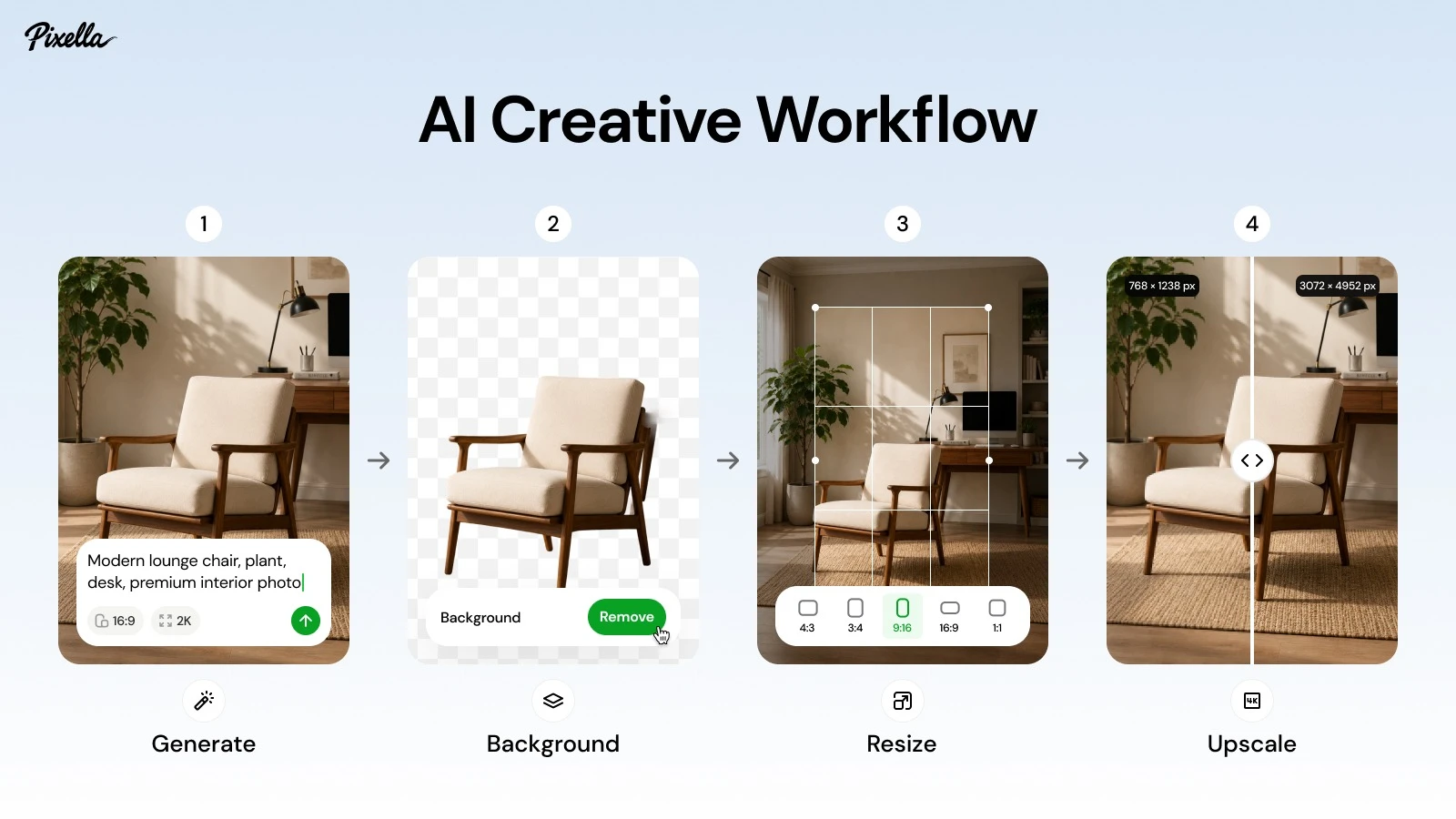
Pixella runs seven tools through a single browser interface. Six are AI-driven. One, the Image Resizer, is a straightforward formatting utility with multiple platform presets and no generative component. That separation matters for designers who want to know exactly which outputs carry an algorithmic layer. A short Pixella review of the set:
| Tool | What it does | Who needs it |
| AI Image Generator | Creates images from text prompts across models like Nano Banana, GPT Image 2, Flux 2.0 Pro | Content teams generating fast visual concepts |
| AI Background Remover | Pulls backgrounds automatically | Product photographers, e-commerce operators |
| Image Resizer | Adapts images to platform and custom dimensions, no AI | Social managers, anyone posting to multiple channels |
| AI Image Upscaler | Pushes resolution up, comparable to restoring an old print to camera-level quality | Designers recovering degraded client files |
| AI Image Editor | AI-powered correction and enhancement | Retouchers managing volume |
| Logo Generator | Produces logo variants from brand inputs | Founders and small businesses without a designer |
The AI Image Generator isn’t tied to a single model. Designers can switch depending on style needs, which is rare for platforms in this category. And the Brand Kit functions as a genuine shared asset library, not a landing page bullet point.
Where Pixella reviews from real users sit
Barbara Cornett-Scott from the US had been stuck on the visual identity stage of building her company. Figuring out the right logo, colours, and fonts felt overwhelming until she ran the process through Pixella and had a design matching her vision in under two minutes.
A designer from Ireland tried the platform for the first time and walked away impressed with both the results and how little friction the interface added. They pointed specifically to thumbnail editing as a strong use case for content creators.
The pattern across these accounts is consistent. Users come in without deep design backgrounds, get usable output fast, and leave satisfied. That’s a legitimate strength, and it tells a professional designer something important about where Pixella fits: production-grade tooling for people who don’t have a production team.
What changes for someone who already has the skills
78% of design professionals say AI tools significantly speed up their workflows, per Figma’s 2025 industry data. But only 58% say those tools improve the quality of their output. That gap matters. Speed without quality is just more revisions.
For a working designer, Pixella’s value lies within a specific range. The AI Background Remover handles batch product photography faster than manual processing in Photoshop. The Image Upscaler recovers resolution from client files that arrive as compressed JPEGs from five years ago. The Image Resizer reformats a single asset for six platforms in the time it would take to set up one artboard. Most Pixella reviews from hands-on users confirm this: the platform compresses the mechanical part of the workflow, not the judgment part.
But the Logo Generator needs several rounds before output feels ready for a client presentation. And the AI Image Generator, while flexible across models, still requires a designer’s eye to sort the usable results from the generic ones. These aren’t flaws so much as honest limits of where generative tools sit today.
What this tells designers who are still deciding
The profession is already past the debate stage. Adoption is a fact. What remains unsettled is which tools earn regular use and which get tried once and dropped. The Designer Fund report found that unreliable output quality is the single biggest reason designers abandon an AI tool. Any honest Pixella review has to be measured against that bar.
For production work, the platform clears it. Background removal, resizing, upscaling, and asset storage all deliver on their promises and do so fast. For creative work, the boundary is sharper. Logo generation and image creation hand you raw material, not a finished product. The designer who uses Pixella well is the one who treats it the way they’d treat an efficient assistant: good at prep, not ready to run the meeting.